












 About Us
 Brand
 Career
 Contact Us



 +91-7314623098


Quick overview:
Payroll implementation is the process of setting up payroll software to manage employee salaries, deductions, taxes, and payments. It involves configuring the system, migrating employee data, setting up salary structures, and checking compliance. A successful rollout requires careful planning, system testing, team training, and regular performance reviews.
Key takeaways
- Payroll implementation involves setting up software, transferring employee data, defining salary structures, and configuring statutory requirements.
- A successful implementation helps you process salaries faster, reduce payroll errors, and ensure timely employee payments.
- Before choosing payroll software, assess your business requirements, budget, workforce size, and integration needs.
- Follow a structured implementation process that covers data migration, software configuration, system integration, team training, and testing.
- Keep employee records updated and monitor payroll performance to maintain accuracy after implementation.
- Stay informed about statutory changes to keep your payroll processes compliant and avoid unnecessary penalties.
According to statistics, 59% of companies report faster and more accurate payroll processing after automation. But ever wondered why not all companies see the same results? The answer lies in payroll implementation.
You can invest in the best payroll software for your business. But if the system isn’t configured properly, you won’t be able to reap its full benefits. Instead, poor payroll implementation can lead to salary calculation errors, delayed payments, compliance issues, and unnecessary manual work.
So, how do you get it right? This guide covers everything you need to know about payroll implementation, from steps to best practices, so you can ensure a smooth and successful rollout.
What Does Payroll Implementation Involve?
Payroll implementation is the process of setting up a payroll system to manage employee salaries, deductions, taxes, and payments. It consists of five key elements:
1. Software Setup
The first part is getting the payroll software ready for your organisation. This means configuring payroll cycles, salary components, allowances, deductions, and approval workflows to match your existing payroll policies.
2. Employee Data Entry
Your payroll system needs accurate employee information to calculate salaries correctly. This includes personal and bank details, salary structures, attendance records, leave balances, tax declarations, and other statutory information. Existing records also need to be transferred to the new system.
3. Pay Structure Definition
How does your organisation calculate employee salaries? This is where you define the different components of compensation, including basic pay, allowances, bonuses, incentives, and deductions. The structure may also vary depending on employee roles and salary agreements.
4. Compliance Check
Tax and labour regulations are an important part of payroll management. The system must account for applicable requirements such as PF, ESI, professional tax, and TDS, along with the relevant contribution rates, deductions, and filing deadlines.
5. System Integration and Testing
Payroll data often comes from different systems. Integrations with HRMS, attendance, leave management, and accounting software help bring this information together. Before going live, test runs check whether the system calculates salaries, deductions, and payslips correctly.
What Does a Successful Payroll Implementation Look Like?
When your payroll system is implemented correctly, it changes how your organisation handles every aspect of payroll, from processing salaries to meeting compliance requirements. Here’s what that looks like in practice:
1. Faster Salary Processing
A well-configured payroll system automates routine tasks like salary calculations, deductions, and payslip generation. This reduces the time HR and payroll teams spend processing salaries every month, allowing them to focus on other responsibilities.
2. Accurate and Timely Payments
When employee details, salary structures, attendance, and deductions are correctly set up, the system can calculate salaries more accurately. This reduces payroll errors and helps ensure employees receive the right amount on time. In fact, Deloitte reports that automated payroll processing can reduce errors by up to 50%.
3. Stronger Compliance
A properly implemented system accounts for applicable statutory requirements, including PF, ESI, professional tax, and TDS. It also helps teams apply the correct deductions, maintain payroll records, and meet filing deadlines, reducing the risk of compliance gaps and penalties.
4. Less Manual Work
Automated workflows reduce the need for repetitive data entry, manual calculations, and spreadsheet-based tracking. Integrations with HRMS, attendance, and leave management systems also minimise duplicate data entry and make payroll operations easier to manage.
5. Better Employee Experience
Employees expect their salaries to be accurate and paid on time. A reliable payroll system helps meet these expectations while giving employees easier access to payslips, salary details, and tax information. This improves transparency and builds trust in the organisation’s payroll process.
Payroll Implementation Checklist: A Step-by-Step Guide for Businesses
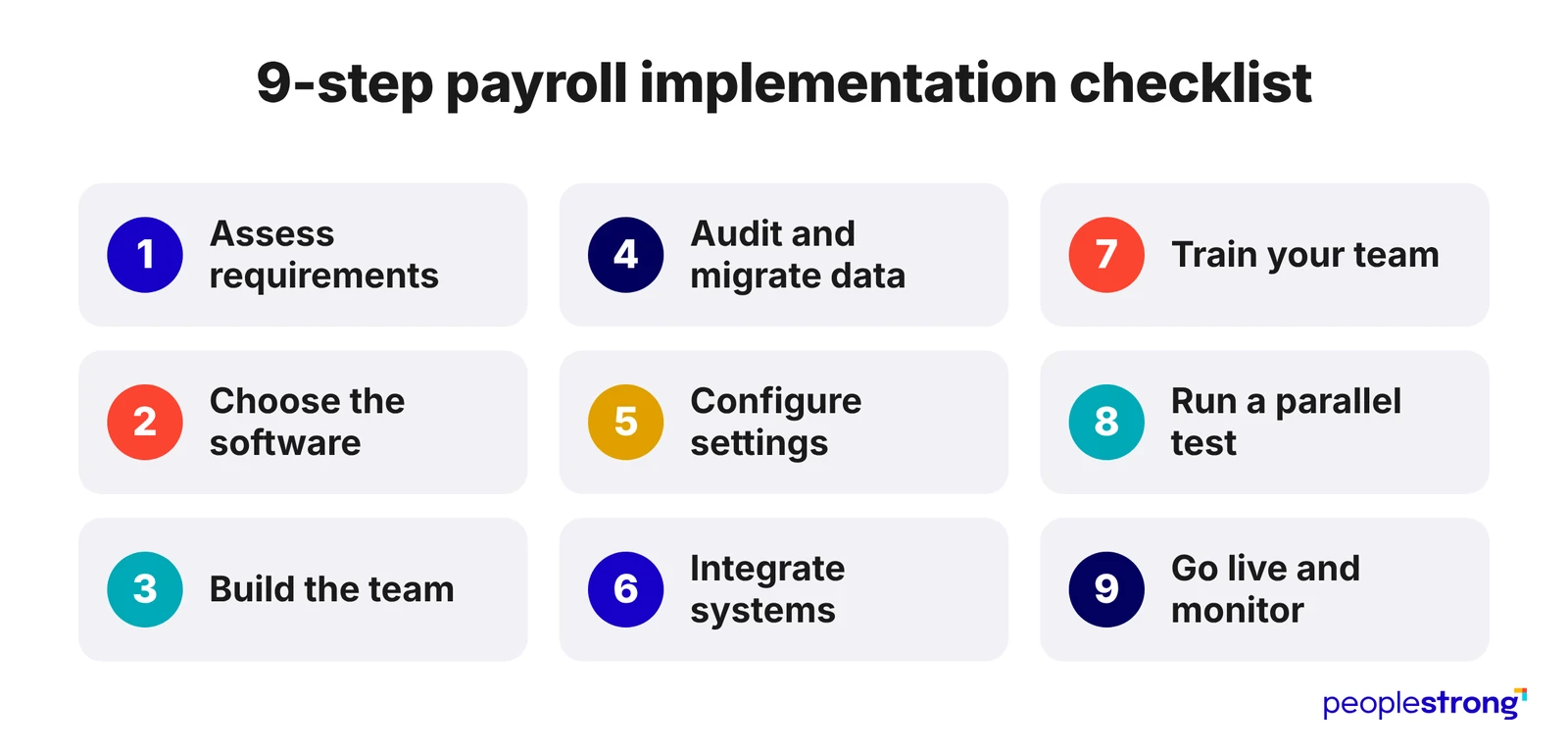
Switching to a new payroll system involves several moving parts, from preparing employee records and configuring the software to training your team and testing the system. Getting each stage right helps you avoid disruptions and ensures your payroll is ready to run smoothly. So here’s a step-by-step checklist of the payroll implementation steps you should follow:
Step 1: Assess Your Requirements
Start by reviewing your existing payroll process. Identify the challenges you want to address, the tasks you want to automate, and the features you need. Consider your workforce size, salary structures, pay cycles, compliance requirements, and future business needs.
Step 2: Choose the Right Software
Compare solutions based on your requirements, budget, scalability, integrations, and data security. If you operate in India, check whether the software supports statutory requirements such as PF, ESI, professional tax, and TDS. Also, consider the provider’s implementation and support services.
Step 3: Build an Implementation Team
Bring together representatives from HR, payroll, finance, and IT. Assign clear responsibilities so each team knows what it needs to handle. You should also appoint a project lead to coordinate the process, track milestones, and communicate with your software provider.
Step 4: Audit and Migrate Employee Data
Review your existing employee records before transferring them. Check personal and bank details, PAN, UAN, salary structures, attendance, leave balances, and tax declarations. Correct outdated or incomplete information, remove duplicate entries, and verify the migrated data against your original records.
Step 5: Configure Software Settings
Set up the software according to your company’s payroll policies. Define pay cycles, salary components, allowances, bonuses, deductions, reimbursement rules, and approval workflows. Configure applicable statutory deductions and contribution rates based on your employees’ details and locations.
Step 6: Integrate Existing Systems
Connect your payroll software with the systems you already use, such as HRMS, attendance, leave management, and accounting software. This helps you transfer relevant information automatically, reduce duplicate data entry, and maintain consistent records.
Step 7: Train Your Team
Make sure your HR and payroll teams know how to use the new system. Train them to process salaries, update employee records, generate reports, and handle common errors. You should also show employees how to access payslips and use self-service features.
Step 8: Run a Parallel Payroll Test
Before going live, process a test payroll through your new system and compare the results with your existing process. Check salary calculations, deductions, net pay, statutory contributions, and payslips. Resolve discrepancies before switching over.
Step 9: Go Live and Monitor Performance
Once everything is ready, start processing payroll through the new system. Monitor the first few pay cycles closely to catch calculation errors, payment issues, or integration problems. Keep your software provider involved so you can resolve issues and fine-tune the system as needed.
3 Best Practices for a Smooth Payroll Implementation Process
Getting your payroll system up and running is only part of the job. Follow these best practices to ensure it continues to deliver the expected results:
1. Keep Employee Data Updated
Accurate employee information is essential for error-free payroll processing. So, make it a practice to review and update employee records whenever details such as salary, bank accounts, tax declarations, attendance, or leave balances change. This will help you avoid incorrect salary calculations and discrepancies.
2. Stay Updated on Statutory Changes
Payroll regulations and tax requirements change often. So, keep track of updates to PF, ESI, professional tax, TDS, and other applicable regulations. Also, make sure your payroll system reflects these changes so you can maintain compliance and avoid penalties.
3. Review Payroll Performance Regularly
Don’t assume everything will continue running smoothly after implementation. Review payroll reports, salary calculations, payment timelines, and employee queries regularly. Also, look for recurring errors or delays and address them before they become bigger issues.
Conclusion
Getting payroll implementation right is essential to building a reliable payroll process. The way you set up your system can affect salary accuracy, compliance, and how efficiently your team handles payroll as your business grows. So, take the time to assess your requirements, choose software that fits your needs, and plan the transition carefully.
Ready to make payroll easier to manage? Explore PeopleStrong. Our cloud-based payroll management software helps you automate salary calculations, manage statutory compliance, and connect payroll with your existing HR processes. Get the right tools and support to simplify payroll implementation and manage your business’s payroll needs with confidence.
Frequently asked questions
Why is it important to implement payroll software properly?
Payroll software performs only as well as its setup. A single wrong salary component or statutory rule repeats in every pay run, which causes calculation errors and late payments. A clean implementation prevents these problems at the source. It also lets automation save time rather than create rework.
How long does it take to implement payroll?
Most payroll implementations take 4 to 12 weeks. Small teams with simple pay structures can go live in 2 to 3 weeks. Larger organisations with multiple locations and custom pay components usually need about three months. The timeline depends mainly on the quality of your employee data and the number of systems you must connect.
Can small businesses implement payroll software without an IT team?
Yes. Most modern payroll software runs in the cloud, so you do not need servers or developers. A member of your HR or finance team can set up the system and test it. The vendor’s support team usually handles technical tasks such as integrations. You need IT help only if you plan to connect custom or legacy systems.
What data do you need to collect before starting payroll implementation?
You need each employee’s personal and bank details, along with their PAN and UAN. You also need their salary structures, attendance records, leave balances, and tax declarations. Your company’s PF and ESI registrations complete the set.
What are the most common mistakes to avoid during payroll implementation?
The most common mistake is migrating employee data without checking it, because old errors carry into the new system. Many teams also skip the parallel payroll test, so calculation gaps surface only after payday.