












 About Us
 Brand
 Career
 Contact Us



 +91-7314623098


The best person to ask how to choose payroll software is often the person running your payroll today.
Ask them to show you what happens between receiving the month’s inputs and approving salaries (especially the work they do outside the system).
Each manual check gives you something specific to investigate.
Is the software missing a capability, or does the process need fixing?
Answering these questions before you shortlist vendors helps you choose payroll software that meets your business’s requirements.
Quick overview:
To choose payroll software, document your pay rules, verify local compliance, test difficult scenarios, check integrations and security, compare total costs, and confirm implementation and support responsibilities.
Key takeaways
- Build requirements around recurring payroll problems and planned business changes.
- Verify compliance capabilities separately for calculations, filings and payments.
- Test corrections, failed integrations and approval controls during demonstrations.
- Compare implementation, support and exit costs alongside subscription fees.
- Require evidence for every essential capability before scoring vendors.
- Reconcile parallel payroll runs before approving the switch.
What is payroll software?
Payroll software applies your organisation’s pay rules to employee and attendance data, calculates earnings and deductions, and produces payroll records.
Depending on the product and service agreement, it may also prepare statutory reports, support salary payments and connect payroll entries to accounting.
Pro tip: When choosing payroll software, check whether it calculates statutory dues, prepares returns or also submits them. Ask the vendor to specify which tasks are included and which your team will still need to complete.
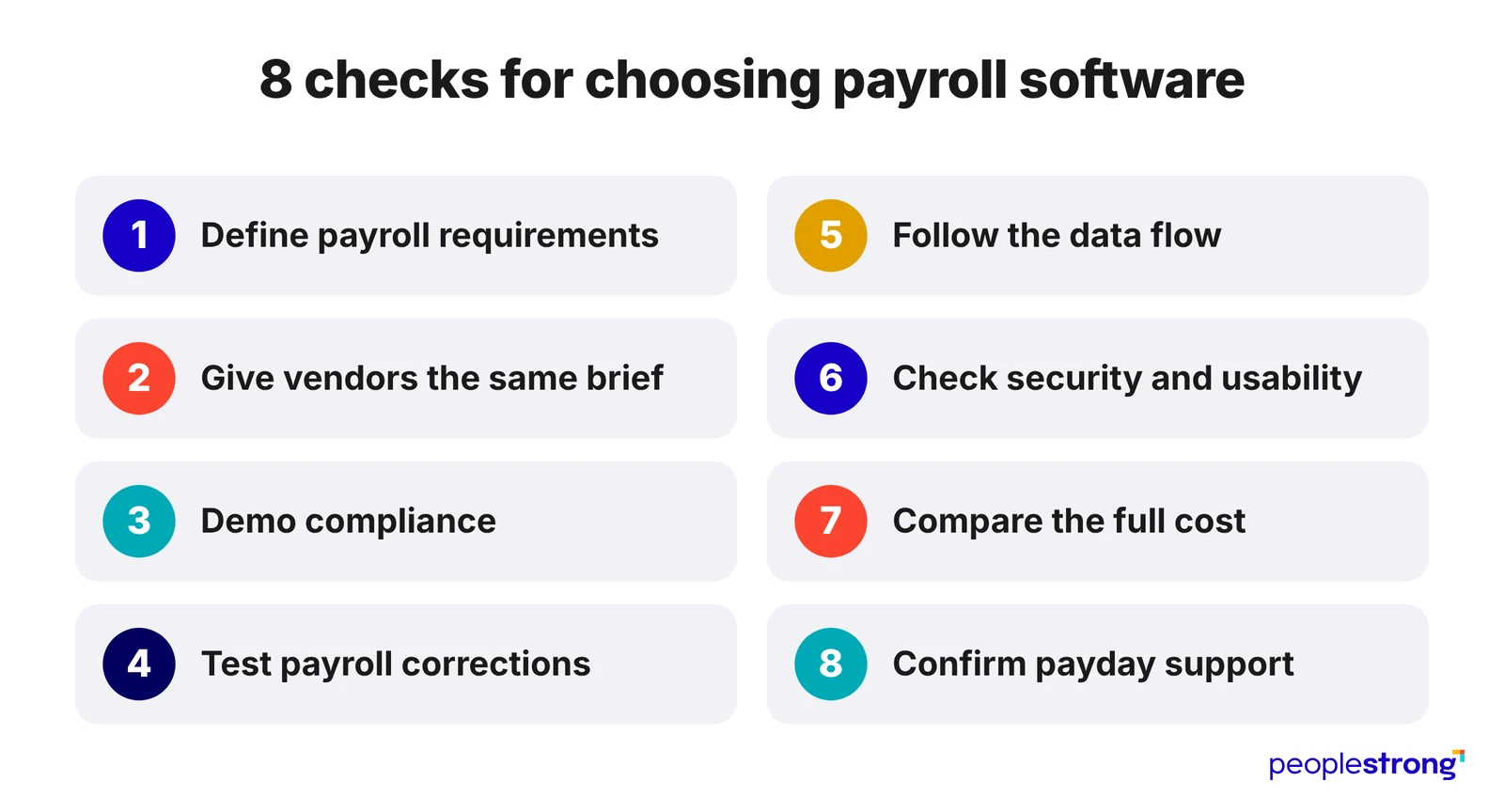
1. Define your payroll requirements before booking demos
Review the last three payroll cycles with your payroll administrator, HR and finance.
For each problem, record:
- what happened
- how the team resolved it
- whether the same work comes up every month
Use a table to turn the findings into requirements:
| What happened | What to ask the vendor to demonstrate |
|---|---|
| A salary increase was approved with a retrospective effective date. | Calculate arrears across closed months and show the adjustment on the payslip. |
| Approved attendance corrections arrived after payroll closed. | Recalculate the affected employee’s pay while retaining a record of the original calculation. |
| Finance manually reassigned payroll expenses to cost centres. | Generate accounting entries using your cost-centre allocation rules. |
Record the time spent on each workaround, using estimates where necessary.
2. Give every vendor the same requirements
Prepare a brief covering your employee count, legal entities, work locations and pay schedules.
Explain the rules behind your salary calculations, including overtime, incentives and deductions, and specify who prepares and approves payroll.
Include confirmed expansion plans and likely changes over the next two years. If another office is opening, for example, ask what adding its employees, payroll rules and reporting requirements would involve.
Pro tip: Employee count alone will not tell a vendor how complex your payroll is. Include examples of the calculations and corrections your team regularly handles so the demonstration reflects the work you need the software to do.
3. Make compliance a demonstration requirement
Ask each vendor to demonstrate how its software handles the statutory requirements applicable to your employees and work locations.
For an Indian business, this may include EPF, ESI, salary tax deductions, Professional Tax and Labour Welfare Fund contributions.
Give the vendor sample employee records and ask to see the calculation, the statutory report and any steps your team must complete outside the software.
| What to verify | What to ask the vendor to show |
|---|---|
| Coverage across your locations | Apply the relevant rules to employees in each state where you operate. |
| Different employee categories | Explain which deductions and contributions apply to each sample employee and show the calculations. |
| Regulatory updates | Walk through a recent rule change, including its effective date, testing and release to customers. |
| Corrections | Correct a previously processed statutory amount and show the records needed for any subsequent filing adjustment. |
Agree on Who Completes Each Statutory Task
Before choosing payroll software, ask the vendor to document responsibility for calculations, reviews, return submissions and payments. A system that generates a filing-ready report may still require your team to upload it and make the payment.
Also confirm who investigates discrepancies, prepares corrections and responds to statutory notices. Include these responsibilities in the service agreement so your team can plan the work it will retain.
Verify Coverage for Each Country
If you operate outside India or have confirmed expansion plans, request a separate breakdown for each country. Ask:
- Which payroll calculations and statutory submissions are supported?
- Does the vendor deliver the service directly or through a local partner?
- Who resolves a payroll issue involving that partner?
- Where is employee data processed and stored?
- Which implementation and ongoing service charges apply?
Pro tip: Ask the vendor to identify any required compliance task that the software cannot complete. Record how your team or the service provider will handle it before signing.
4. Test how the software handles payroll corrections
Give shortlisted vendors the same anonymised or synthetic employee records and expected results. Ask your payroll administrator to test:
- A backdated salary increase requiring arrears.
- An unpaid-leave deduction reversed after payroll closes.
- A bonus omitted from an approved payroll run.
- A final settlement requiring a correction.
Trace each adjustment through approval, the revised payslip, payment output and accounting entry. Check how the system prevents a payment already made from being paid again.
Verify that corrections retain the original record and log who changed and approved them. Test whether unauthorised users can reopen closed periods or approve their own changes.
Record any calculations or reconciliations that still require a spreadsheet.
5. Follow the data between HR, Attendance and Finance
Ask the vendor to trace an approved attendance correction from your leave and attendance system through payroll to the accounting entry. Verify:
- Which fields transfer automatically and which require manual entry.
- Whether updates arrive before your payroll cutoff.
- How failed transfers are flagged and corrected.
- Whether retrying a transfer creates duplicate records or payments.
- Whether accounting entries use the correct cost centres and ledger codes.
Specify which system holds the approved value for each field, such as salary details in your HRMS platform. Assign responsibility for resolving mismatches before payroll approval.
6. Evaluate security and everyday usability together
Payroll contains salary, bank and identity information. Request evidence of encryption, multifactor authentication, role-based permissions, access logs and recovery testing. Review the scope and validity of security assurance reports.
Ask where data is hosted, which subcontractors can access it and how access is removed when administrators leave. Have IT review these answers before choosing payroll software.
Then test employee self-service on a phone. Can employees retrieve payslips, view deductions and raise a pay query? Can an administrator identify the relevant calculation and respond clearly?
7. Compare the full cost of choosing payroll software
Give every vendor the same headcount, locations and growth assumptions, then request an itemised three-year quote.
| Cost category | What the quote should cover |
|---|---|
| Implementation | Setup, data migration, integrations and training. |
| Subscription | Charges per employee, entity, country and administrator account. |
| Additional Services | Off-cycle payroll runs, support upgrades and configuration changes. |
| Renewal and Exit | Annual price increases, notice periods and charges for exporting historical records. |
- Ask vendors to calculate the bill at your current headcount and projected size.
- Confirm whether inactive employees remain billable and whether adding an entity triggers another setup fee.
- Include the internal work each option leaves behind.
- If payroll still requires monthly spreadsheet calculations or manual accounting entries, estimate those hours and their cost over three years.
Pro tip: Put pricing assumptions and agreed renewal increases in the contract. An introductory discount tells you little about what you will pay in years two and three.
8. Check who helps when payday is at risk
ADP’s 2026 payroll research found that 74% of APAC payroll leaders surveyed reported staffing shortages had affected payroll operations.
- Ask for payroll-critical escalation routes, support hours and contractual response targets. Distinguish a first response from a resolved problem.
- Speak to a reference customer with comparable payroll complexity and ask about their most recent difficult pay run.
- Choosing payroll software also means choosing an operating model. If your team needs ongoing processing help, compare the software-only option with managed payroll services, including retained responsibilities and approval controls.
Bring Your Payroll Requirements to PeopleStrong
Prior to choosing a payroll system, see how it handles a complicated month at your company.
Include the adjustments, attendance discrepancies and approvals your team regularly deals with.
And before you decide, look beyond the price: check what worked in the demo, which gaps are still open and what the vendor has agreed to deliver in the contract.
To evaluate PeopleStrong’s payroll software, bring these examples to the demo.
Ask to see how each one is processed and how your team would check the results.
You should leave with a clear understanding of how the software fits your payroll process and where your team would still need to step in.
Frequently asked questions
How Do I Choose Payroll Software for a Small Business?
To choose payroll software for a small business, list your pay schedules, employee and contractor types, work locations and statutory obligations. Use these requirements to shortlist systems within your budget, then ask for a demo using examples from your payroll. Check that everyday tasks are easy to follow, support is available when you need it and pricing is clear. Find out whether adding employees or locations would require a plan upgrade or a move to another product.
What Features Matter Most When Choosing Payroll Software?
The payroll software features that matter most are accurate salary calculations, support for local tax and statutory requirements, approval workflows, audit trails and payroll reports. Check that the software connects with your attendance, HR and accounting systems. Employee self-service can reduce routine requests for payslips and personal details, while reliable support helps your team resolve payroll issues. Prioritise features based on your workforce and the work your payroll team needs to handle.
Can a Business Change Payroll Software Midyear?
Yes, a business can change payroll software midyear, provided the new system can accept the opening balances and historical data needed to process payroll correctly. Before switching, reconcile year-to-date earnings, deductions, taxes and statutory contributions. Confirm who will handle outstanding filings and corrections, and keep access to records held in the previous system. Running both systems for a payroll cycle can help identify discrepancies before the new software takes over.
How Should a Business Compare Payroll Software Pricing?
To compare payroll software pricing, ask each vendor to quote for the same number of employees, legal entities, locations and services. Calculate the total cost over three years, including subscriptions, implementation, integrations, training, support and exit fees. Ask vendors to put their pricing assumptions in writing and explain any additional charges for extra payroll runs, employee growth and annual renewals.