












 About Us
 Brand
 Career
 Contact Us



 +91-7314623098


Quick overview:
Payroll data migration is the controlled transfer of employee records, pay history, tax details, deductions, benefits, bank instructions and payroll rules from one system to another. The process involves defining the scope, cleaning and mapping data, configuring the new system, transferring records securely, reconciling balances and running parallel payroll tests. A successful migration preserves accurate employee pay and produces payment files, tax records and accounting entries that reconcile with approved source records.
Key takeaways
- Define the scope and ownership before moving data: Identify the employees, entities, historical periods and integrations included, and assign owners for testing, approvals and cutover.
- Clean and reconcile source records first: Resolve duplicates, missing details and conflicting balances before transferring them to the new system.
- Map payroll fields by function: Check calculation rules, tax treatment, effective dates and accounting codes so transferred data produces the expected payroll results.
- Reconcile year-to-date balances during a mid-year move: Include former employees paid during the reporting year and clarify which system owns filings, amendments and year-end documents.
- Test payroll results and connected systems: Run trial conversions and parallel payroll, cover exceptional pay scenarios, and investigate variances before approving go-live.
- Verify the first live payroll before closing the old system: Confirm payments, tax records, benefits, payslips and ledger entries, and retain source records and approval evidence.
Payroll migration is judged by a simple outcome: whether every employee receives the correct pay, in the correct account, on time.
An error can reduce someone’s salary, distort a tax record, or direct funds to the wrong bank account.
Even a small discrepancy can weaken confidence in payroll and create more work for employees, HR, finance, and compliance teams.
Statistically, the 2026 KPMG and UKG Global Payroll Survey estimates that payroll errors, inefficient processes, and poor data can cost companies between 2% and 4% of total labour spend.
A payroll migration must therefore protect every payslip, payment, tax record, and accounting entry from the first live run.
What is payroll data migration?
Payroll data migration is the controlled transfer of payroll records, calculation rules, balances, integrations, and approval controls from one system to another.
Its purpose is to preserve accurate pay, statutory compliance, financial reporting, data security, and payroll continuity.
The migration is complete when the new system produces accurate payroll results that reconcile with banking, tax, benefits, and finance records.
A complete payroll migration commonly includes:
- Employee and contractor records, including leavers paid during the tax year
- Pay rates, schedules, earnings, bonuses, overtime, and adjustments
- Year-to-date wages, taxes, deductions, contributions, and taxable wage bases
- Benefits, garnishments, loans, leave balances, and retirement elections
- Entities, tax registrations, cost centres, bank instructions, roles, and approvals
- Payroll registers, filings, deposit evidence, payslips, audit history, and integrations
Why payroll migration projects go wrong
Many payroll migration problems come from the source system rather than being created during the transfer.
Duplicate records, undocumented workarounds, missing former employees, and disputed figures may remain unnoticed during routine processing.
A migration brings them into view because every record must be mapped, checked, and reconciled.
ADP’s 2026 global payroll research makes the scale of the problem clearer.
Only about half of the organisations surveyed had automated payroll data collection, entry, reconciliation, or reporting.
Disconnected systems and unclear ownership continued to weaken accuracy. Automation may speed up processing, but it cannot resolve contradictory records or identify which source should govern payroll.
The first migration risk to address is source data quality.
- Incomplete or conflicting source records: Match employee counts and year-to-date totals against payroll registers, tax filings, bank payments, benefit files, and ledger balances. Record each correction with the original value, revised value, reason, and approver.
- Mapping fields by name rather than function: Confirm how each field affects tax, net pay, reporting, and accounting. A deduction can occupy the correct field and still produce the wrong result if its tax treatment, priority, or effective date changes.
- Transferring payroll mid-year: Reconcile year-to-date wages, taxable earnings, taxes, deductions, contributions, and adjustments for every employee. Record which system owns each filing, amendment, payment, and year-end document during the transition.
- Unclear accountability across functions: Assign one approver to each reconciliation, configuration area, integration, and go-live decision. Give the migration lead authority to stop payroll release when totals remain unexplained or approval evidence is missing.
- Test coverage limited to standard payroll cases: Test leavers, retroactive pay, garnishments, reversals, off-cycle payments, negative net pay, and split deposits. Verify the calculation, tax result, bank output, payslip, benefit file, and ledger entry for each case.
The payroll migration process, step by step
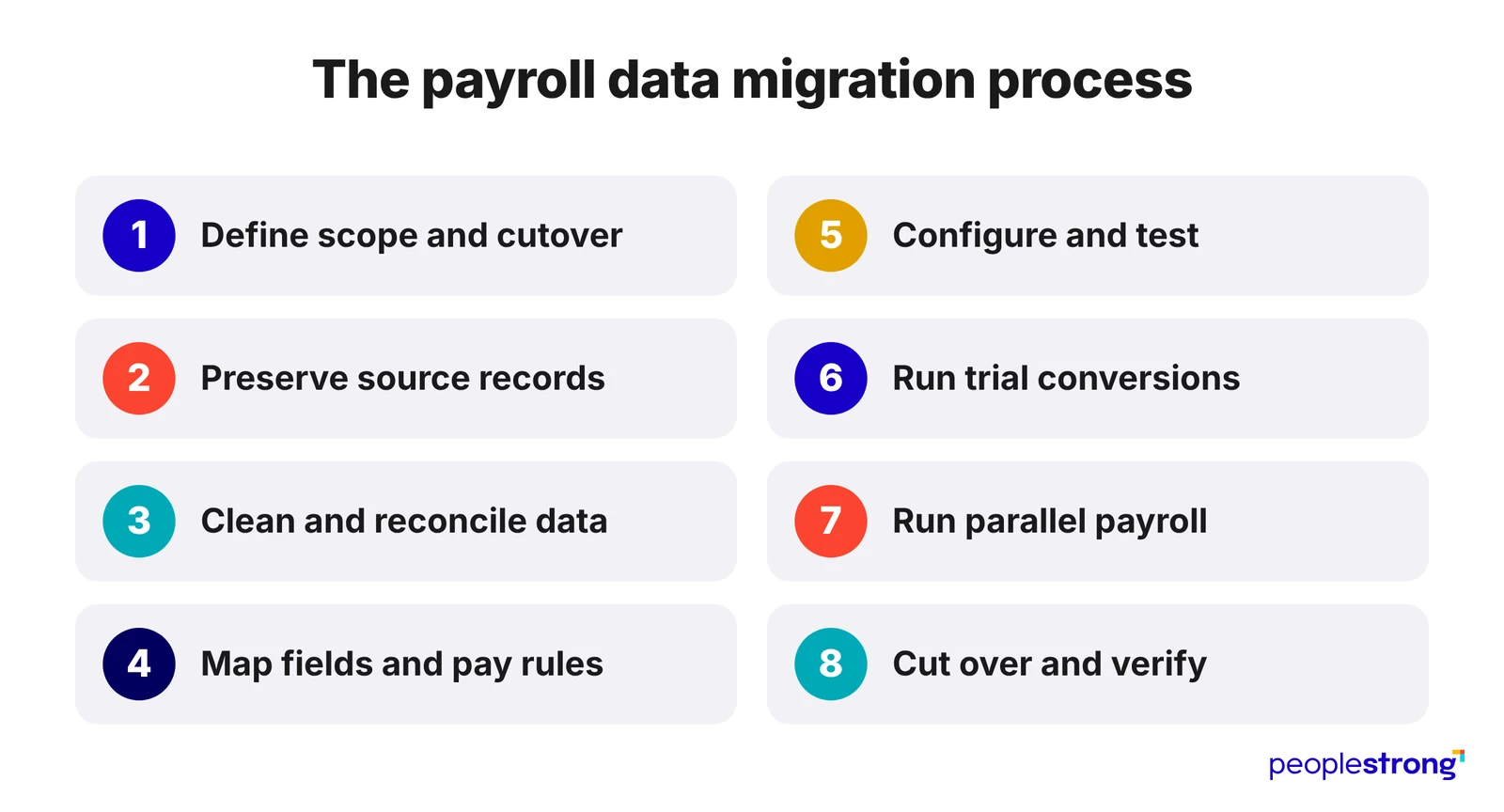
1. Define the scope and cutover
- Do this: List the entities, countries, pay groups, workers, historical data, integrations, reports, and documents included. Set the cutover date and assign owners.
- Validate before proceeding: Agree on limits for rounding, defects, record-count differences, and unreconciled balances. For a mid-year move, account for every current-year wage, tax, deduction, contribution, and adjustment.
2. Preserve the source records
- Do this: Create a dated, unchanged export before correcting or reformatting any data. Archive payroll registers, filings, payslips, deposit records, configuration, approvals, and transaction history.
- Validate before proceeding: Record each file’s storage location, permitted users, retention period, and deletion date.
3. Clean and reconcile the data
- Do this: Identify duplicate workers, missing tax details, invalid bank information, conflicting dates, inactive codes, and omitted former employees. Record every correction.
- Validate before proceeding: Match employee counts and payroll totals against tax reports, benefit files, bank payments, and ledger balances. Resolve every unexplained difference.
4. Map fields and payroll rules
- Do this: Map each field according to its calculation and reporting purpose. Record its destination, format, default value, effective date, tax treatment, validation rule, and exception owner.
- Validate before proceeding: Confirm that pre-tax deductions, wage bases, garnishment order, rounding, retroactive pay, leave balances, and unmatched codes produce the expected result.
5. Configure and test the new system
- Do this: Configure entities, calendars, pay groups, earnings, deductions, taxes, benefits, leave, banking, accounting, access rights, approvals, and reports.
- Validate before proceeding: Test HR, time, benefits, banking, tax, identity, and finance connections with accepted, rejected, missing, and duplicate records. Confirm that errors can be corrected and resubmitted.
6. Run trial conversions
- Do this: Complete repeated test loads. Compare record counts, employee values, year-to-date balances, tax liabilities, payment totals, and accounting entries.
- Validate before proceeding: Record the cause, owner, correction, retest result, and approval for every variance. Test new hires, leavers, hourly workers, overtime, retroactive pay, garnishments, reversals, off-cycle pay, negative net pay, and split deposits.
7. Run parallel payroll
- Do this: Process the same payroll inputs in the old and new systems. Compare gross pay, taxable wages, taxes, deductions, contributions, employer costs, net pay, bank totals, and ledger postings.
- Validate before proceeding: Correct, retest, or formally approve every variance before live payroll begins.
8. Cut over and verify live payroll
- Do this: Freeze source-system changes, load the final updates, reconcile the results, and obtain written approval from payroll, finance, HR, security, and IT.
- Validate before proceeding: Confirm funding, bank deadlines, payment approval, tax access, employee communication, and escalation contacts. Retain legacy access until you’ve verified payroll, filings, payments, reports, and accounting entries.
Payroll data migration checklist
Before migration
| Checklist | Record to keep |
|---|---|
| Define the entities, countries, pay groups, workers, historical periods, integrations, reports, dates, and owners. | Approved migration scope |
| Set the cutover date and assign responsibility for tax filings, payments, amendments, and year-end documents. | Cutover and filing calendar |
| Export payroll, tax, benefits, leave, banking, garnishment, and accounting records. Include former workers paid during the current tax year. | Export inventory matched to source counts |
| Preserve unchanged source files and set access, retention, and deletion rules. | Dated source archive |
| Match payroll registers with tax filings, deposits, benefit invoices, bank payments, and ledger balances. | Payroll and finance reconciliation |
Migration and testing
| Checklist | Record to keep |
|---|---|
| Correct duplicates, missing fields, invalid values, inconsistent formats, and outdated records. | Data-correction log showing each change and approver |
| Map fields by purpose, including conversions, defaults, tax treatment, rounding, exclusions, and unmatched codes. | Approved field-mapping file |
| Configure earnings, deductions, taxes, benefits, leave, banking, accounting, access rights, approvals, and calendars. | Approved configuration record |
| Compare each trial load by record count, employee, pay group, tax code, and year-to-date balance. | Trial-load reconciliation |
| Test integrations with accepted, rejected, missing, duplicate, and delayed transactions. | Integration test results |
| Run parallel payroll and test leavers, retroactive pay, garnishments, reversals, off-cycle pay, negative net pay, and split deposits. | Variance report with every difference resolved or approved |
Go-live
| Checklist | Record to keep |
|---|---|
| Load and reconcile hires, terminations, pay changes, leave, bank updates, and adjustments entered after the final trial extract. | Final-load reconciliation |
| Confirm funding, bank deadlines, payment approval, tax access, escalation contacts, and payday support. | Approved go-live record |
After go-live
| Checklist | Record to keep |
|---|---|
| Trace the first payroll through calculation, approval, payment, tax, benefits, payslips, and accounting. | First-payroll reconciliation |
| Record each issue, affected workers, payroll impact, owner, deadline, correction, and retest result. | Post-launch issue log |
| Retain source files, mappings, approvals, test results, reconciliations, and filing records. Keep legacy access until all legal and reporting duties are met. | Migration archive and legacy-system closure approval |
Make the first payroll feel routine with PeopleStrong
A payroll migration proves its worth on payday.
Employees receive the correct amount on time.
Finance can reconcile every entry.
Statutory deductions, benefits, and tax filings continue on schedule.
Payroll teams can trace each figure back to its source and confirm who reviewed and approved it.
Reliable payroll after migration depends on five things: clean data, precise mapping, secure access, rigorous testing, and clear accountability.
A unified HR and payroll platform such as PeopleStrong brings payroll data, workflows, compliance, and reporting into one connected system.
Before choosing a platform, assess how well the provider manages data migration, local payroll requirements, security, testing, and post-launch support. These capabilities directly affect payroll accuracy from the first cycle onward.
Payroll migration is complete when every employee is paid correctly, every figure can be verified, and the same standard is maintained month after month. Connect with our team.
Frequently asked questions
When is the best time to migrate payroll data?
The best time to migrate payroll data is usually at the start of a calendar year, financial year, or payroll quarter. Moving at the beginning of the year reduces the amount of year-to-date payroll information that needs to be transferred. A quarter-start move also creates a clear cut-off point for tax filings and reports. A business can still change payroll systems mid-year, but it must first match year-to-date pay, taxes, deductions, employer contributions, and filing records across both systems.
What data should be included in a payroll migration?
A payroll migration should include every record needed to calculate salaries, make payments, file taxes, and answer future audit queries. The data should cover employee and contractor details, salary and wage information, year-to-date earnings and taxes, deductions, benefits, employer contributions, garnishments, leave balances, bank details, tax registrations, pay rules, accounting codes, access rights, integrations, reports, filings, and approval records. Include former employees paid during the current reporting year.
Is parallel payroll testing necessary during payroll migration?
Yes, parallel payroll testing is necessary because it checks whether the new payroll system produces the right results before employees are paid through it. Payroll teams enter the same information into the old and new systems, then compare gross pay, net pay, taxes, deductions, employer costs, and payment files. Any difference may point to an incorrect setup, a mapping error, a rounding issue, a tax rule, or a failed integration. The team should investigate and fix every significant difference before going live.
How do businesses validate a payroll data migration?
Businesses validate a payroll data migration by checking whether all records have moved correctly and whether the new system calculates payroll as expected. The review should compare employee counts, payroll totals, individual records, year-to-date figures, gross-to-net calculations, statutory deductions, bank files, accounting entries, and connected systems. User testing and parallel payroll runs provide a final check before launch. A completed upload does not prove that the migration is accurate. The payroll results must match, approvals must be recorded, and each figure must be easy to trace.