











 About Us
 Brand
 Career
 Contact Us



 +91-7314623098


When a valued employee resigns, HR processes the exit. But the work doesn’t stop there.
Your HR team needs to probe into whether:
- The candidate’s progression stalled
- Their manager raised concerns
- An internal move could have given them a reason to stay
You can’t get accurate answers to these questions with an incomplete employee record.
An insightful employee record must capture the employee’s performance conversations, career interests and opportunities available elsewhere in the organisation.
To do so, organisations must understand which system to use: HRMS vs HRIS vs HCM. Let’s help you choose the right one.
Key takeaways
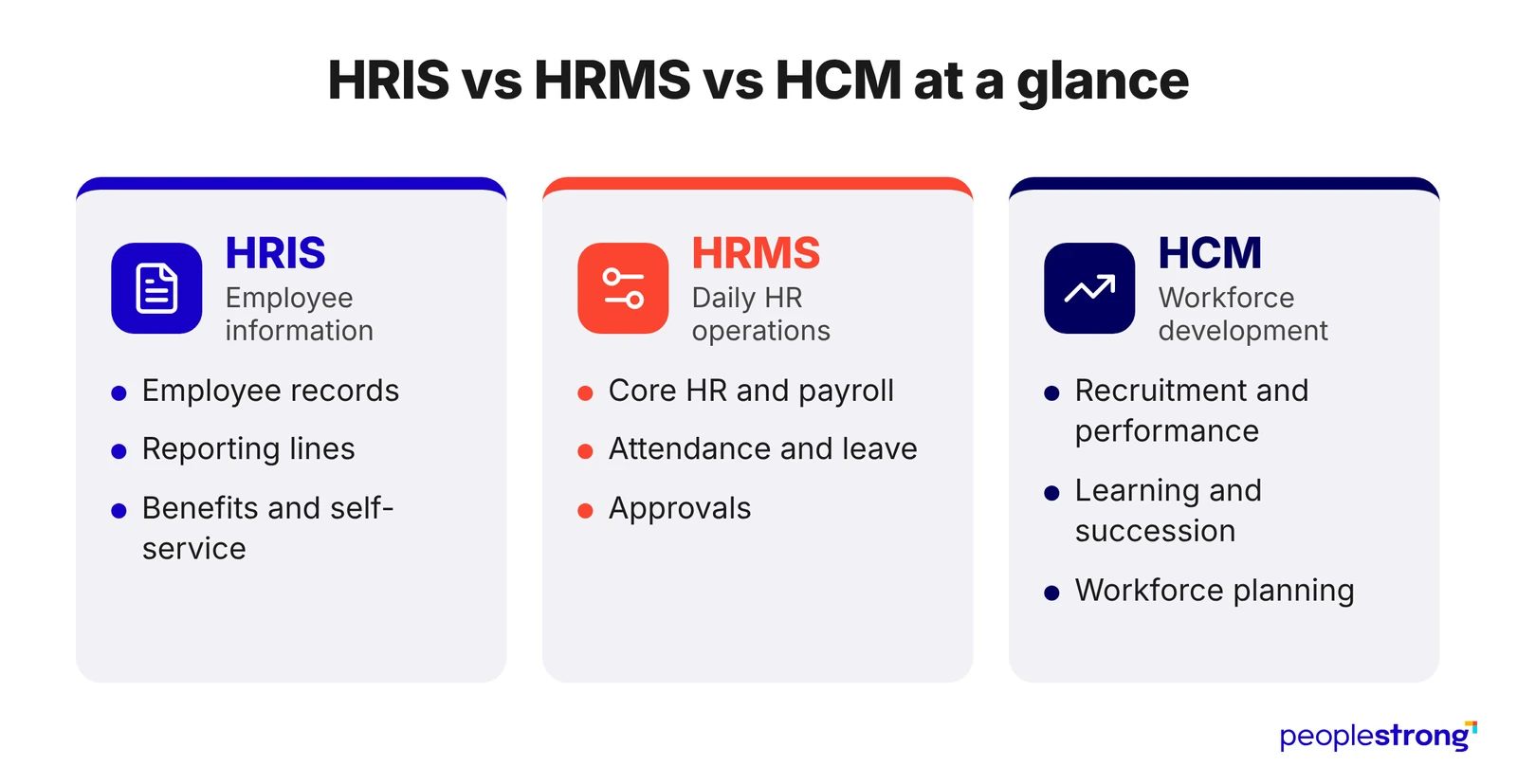
- An HRIS centres on employee information, an HRMS runs daily HR operations and HCM covers workforce development.
- The categories overlap, so compare the capabilities included rather than the product label.
- Choose a system based on the work your team struggles to complete, not employee count alone.
- Payroll and compensation planning, or recruitment and succession planning, answer different questions.
- One platform can combine records, operations and talent management if data stays consistent.
HRMS vs HRIS vs HCM: What Is the Difference?
| System | Main Focus | Common Capabilities |
|---|---|---|
| HRIS: Human Resource Information System | Maintaining employee information | Employee records, reporting relationships, benefits and self-service |
| HRMS: Human Resource Management System | Running daily HR operations | Core HR, payroll, attendance, leave and approvals |
| HCM: Human Capital Management | Managing and developing the workforce | Core HR, recruitment, performance, learning, succession and workforce planning |
The categories overlap. Some HRIS products include payroll, and many HRMS platforms offer talent management. Check the included capabilities in detail.
HRMS vs HRIS: What Is the Difference?
The difference between HRMS and HRIS usually comes down to how much work the system performs around an employee record.
Both can maintain employee information and support everyday administration.
What Do Both Systems Handle?
HRIS and HRMS platforms commonly support these core functions:
- Employee records include employment details, reporting relationships and benefits information.
- Document management keeps contracts, letters and other employment documents accessible to authorised users.
- Employee self-service lets employees retrieve information and update permitted details.
- Administration can include approvals, standard reports and change histories, depending on the product.
An HRIS can therefore support active workflows as well as record-keeping.
Where Does HRMS Typically Go Further?
An HRMS connects employee information with more operational processes. Let’s assume an employee is moving from full-time to part-time work. The HRMS system will help maintain these changes:
| Part of the Change | What the System Needs to Support |
|---|---|
| Employee Record | Record revised contractual hours and the date the arrangement takes effect |
| Approval | Route the proposed change to authorised decision-makers and retain their approval |
| Scheduling | Apply the revised working pattern from the agreed date |
| Attendance | Measure attendance against the employee’s updated expected hours |
| Payroll | Use the approved arrangement when calculating affected pay components |
| Verification | Show whether each affected process received and applied the change |
PeopleStrong’s HRMS software combines core HR with operational capabilities. Assess which steps your proposed configuration supports and where separate applications are involved.
Pro tip: Ask what happens if a change is approved today but takes effect next month. This reveals whether connected processes respect effective dates or simply use the latest record.
HRIS vs HCM: How Much of the Employee Journey Do They Cover?
| HR Activity | Typical HRIS Coverage | What to Assess in HCM Software |
|---|---|---|
| Performance | Maintains roles, reporting relationships and, where included, review records | Connects goals, feedback and assessments with development actions and follow-up dates |
| Learning | Stores qualifications, certifications and training history | Assigns learning against identified skill gaps and tracks participation, completion and subsequent assessments |
| Career Progression | Records previous roles, promotions and tenure | Connects career interests and assessed skills with potential roles and development requirements |
| Succession Planning | Identifies current role holders and organisational structure | Records potential successors, readiness assessments and the experience each person still needs |
| Workforce Planning | Reports current headcount, roles and locations | Supports comparisons between available capability and future requirements, including hiring and development options |
Check Whether Development Actions Lead Anywhere
When assessing development capabilities, check whether the platform can help answer these questions:
- Who needs support? Identify employees with an assessed development need but no assigned action.
- Who is following up? Give each action an owner, a review date and a visible status.
- What has improved? Review evidence of capability after training, rather than treating course completion as proof of progress.
HRMS vs HCM: Where Does the Scope Expand?
HRMS commonly emphasises executing HR processes. HCM extends the focus to how operational information informs workforce decisions. Remember these three distinctions when comparing:
- Payroll processing and compensation planning serve different purposes. Payroll calculates approved pay. Compensation planning supports proposed salary increases, bonuses and their effect on budgets.
- Review administration and employee development require different follow-through. Completing appraisal forms establishes a record. Development requires agreed actions, relevant learning and subsequent progress discussions.
- Vacancy processing and succession planning answer different questions. Recruitment manages an open position. Succession planning considers who could take responsibility for a critical role and what preparation they need.
Which HR System Does Your Organisation Need?
Start with the work your team struggles to complete.
Employee count alone will not tell you whether you need stronger administration, connected HR processes or better support for employee development.
Scenario #1: When Employee Information Is Unreliable
An HRIS may be a suitable starting point if your team regularly encounters these problems.
- Employee details differ across records.
- Finding employment documents takes too long.
- Employees contact HR for information they should be able to access themselves.
Pro tip: Prioritise a central employee record, self-service, access controls and a history of changes. If your existing payroll or recruitment software works well, check whether the HRIS can connect with it.
Scenario #2: When Recurring Processes Consume HR’s Time
Look at broader HRMS capabilities when accurate records still leave your team chasing routine work.
- Attendance corrections delay payroll preparation.
- Leave requests stall when an approver is unavailable.
- HR repeatedly transfers approved changes between applications.
Focus on approval routing, attendance integration and payroll connections. Explore how PeopleStrong’s payroll software brings relevant inputs into the payroll process.
Pro tip: List the tasks HR repeats every pay cycle. Use that list to identify where automation would save time.
Scenario #3: When Employee Development Lacks Follow-Through
Consider HCM capabilities when development discussions produce little visible progress.
- Reviews identify learning needs, but nobody tracks the next steps.
- Employees cannot find relevant internal opportunities.
- Succession decisions depend on what individual managers remember.
Look for connections between performance reviews, learning, career interests and succession planning.
PeopleStrong’s HCM platform combines core HR with talent functions that support this work.
Scenario #4: When Several Needs Exist Together
You may need stronger records, operations and development support at the same time. Set priorities before deciding how much to introduce.
- Identify immediate needs. Address the problems disrupting work today.
- Map the connections. Establish which functions must share information.
- Assign responsibility. Decide who will maintain records, manage workflows and follow up on development actions.
Put Better HR Decisions Into Practice
The real value of HR software becomes clear after implementation, when the team relies on it.
Payroll should require fewer corrections. Managers should have the information to conduct useful reviews, and employees should be able to follow the progress of their requests and development plans.
Use these outcomes to judge your options. The distinction between HRIS, HRMS and HCM is useful when it helps you identify the capabilities needed to deliver them.
Explore PeopleStrong to connect core HR, payroll and talent management. Let your team’s everyday challenges guide you to the right HR software for your organisation.
Frequently asked questions
Are HRIS, HRMS and HCM Interchangeable Terms?
HRIS, HRMS and HCM are often used interchangeably, but their emphasis differs.
- A human resource information system (HRIS) centres on employee information.
- A human resource management system (HRMS) typically adds operational processes.
- Human capital management (HCM) covers workforce management and development more broadly.
Does an HRIS Include Payroll and Attendance Management?
A human resource information system (HRIS) may include payroll and attendance management, offer them as additional modules or connect to separate applications. Check the specific subscription and country coverage. Storing salary details or working hours does not necessarily mean the HRIS calculates pay or processes attendance automatically.
Is HCM More Comprehensive Than HRMS?
Human capital management (HCM) software generally emphasises broader workforce capabilities, including career development, succession planning and workforce planning. However, many human resource management systems (HRMS) also offer these functions. An HCM label alone does not establish greater capability. You must compare the depth of the modules each product provides.
Does a Business Need Separate HRIS, HRMS and HCM Systems?
A business does not need three separate systems simply because HRIS, HRMS and HCM have different names. One platform can combine employee records, HR operations and talent management. Alternatively, an organisation can connect specialised applications, provided information remains consistent and responsibilities for maintaining it are clear.
Which Should a Small Business Choose: HRIS, HRMS or HCM?
A small business should choose HR software according to its workload and requirements. An HRIS may suit employee records and basic administration. Broader HRMS capabilities can support complex payroll or attendance needs. HCM capabilities become relevant when structured recruitment, performance management and employee development are also priorities.
When Should a Business Move From HRIS to HRMS or HCM?
A business should reassess its human resource information system (HRIS) when missing capabilities cause recurring manual work, errors or gaps in employee support. HRMS may address operational needs while HCM may support broader talent requirements. Additional modules and better integrations may resolve the problem without replacing the existing HRIS.
Can an Existing HRIS Connect With HCM Tools?
An existing human resource information system (HRIS) can connect with recruitment, performance, learning and other human capital management (HCM) tools through supported integrations. Confirm what information transfers, how often it updates, and whether changes move in both directions. Define who resolves failed transfers and conflicting employee records.