











 About Us
 Brand
 Career
 Contact Us



 +91-7314623098


Two Human Resource Management Systems (HRMS) platforms can offer the same features and leave your business with very different bills and responsibilities.
One lets HR change an approval process in minutes.
Another requires a support request, a developer and a separate invoice. Both may handle payroll, attendance and employee records, but the effort involved can differ as much as night and day. These differences deserve your attention before you sign the contract.
Understanding the types of HRMS helps you see what sits behind the feature list.
On-premise, cloud, hybrid, and open-source software each offer a different balance of control, cost, and maintenance.
The right choice depends on which responsibilities your team can handle.
Key takeaways
- The four main types of HRMS are on-premise, cloud, hybrid and open source.
- They differ in where the software runs, who maintains it and whether you can modify the code.
- Cloud HRMS reduces infrastructure work, while on-premise and open source keep upkeep with your team.
- Hybrid setups need clear data ownership so records stay consistent across systems.
- Compare three-year costs, including the internal work your team will retain.
What are the main types of HRMS?
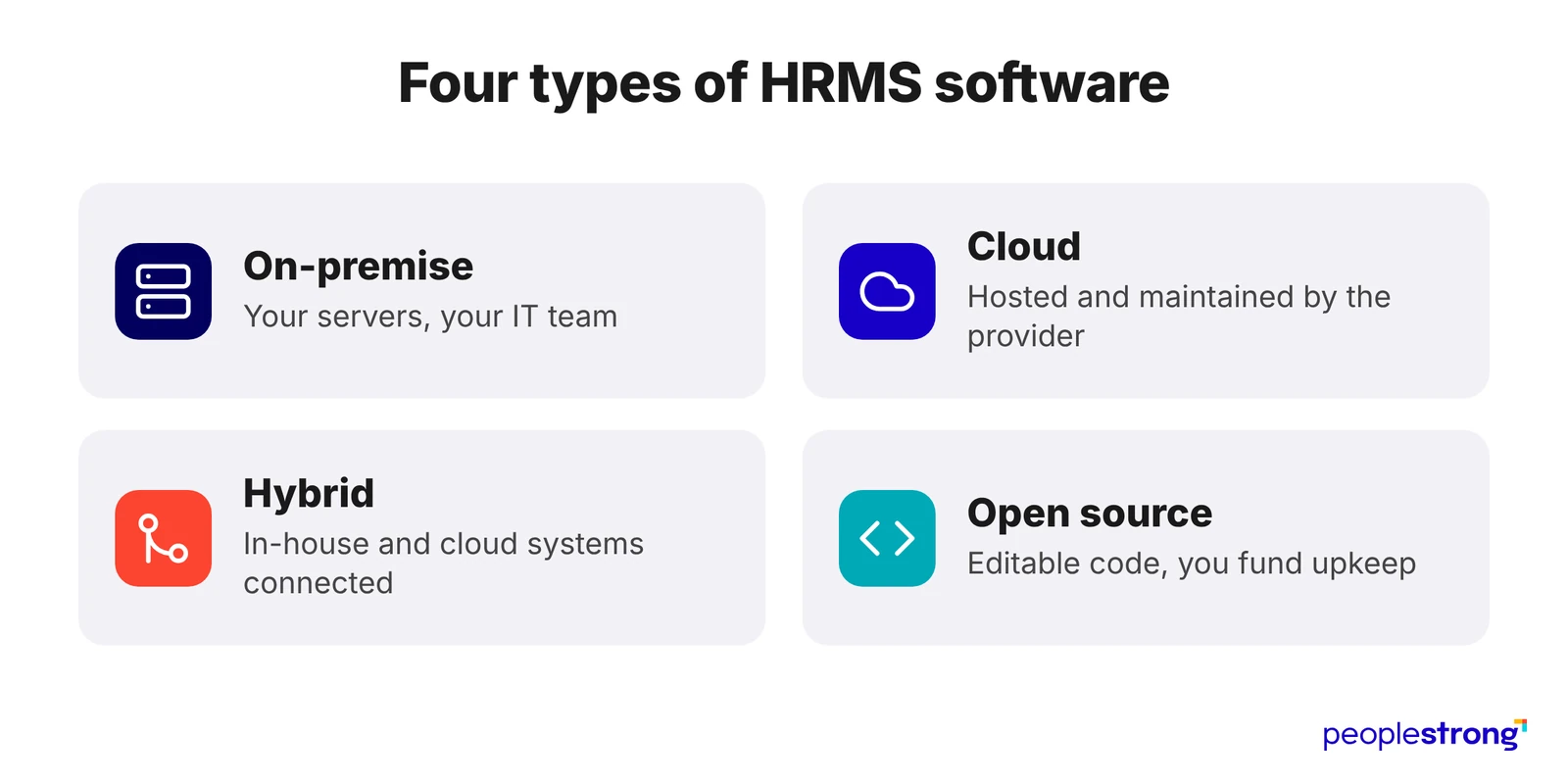
The main HRMS options are on-premise, cloud, hybrid and open source. They differ in where the software runs, who maintains it and whether you can modify its code:
- On-premise HRMS runs on your company’s servers, and your IT team (or a service partner) handles maintenance.
- Cloud HRMS runs on remotely hosted servers, usually through a subscription that covers maintenance and updates.
- Hybrid HRMS connects internal and cloud systems, such as on-premises payroll and cloud recruitment software.
- Open-source HRMS gives you access to source code you can modify under its licence.
What is HRMS software?
A human resource management software connects employee records with:
- payroll
- attendance
- leave
- benefits
- onboarding
Pro tip: Some products also include recruitment, performance reviews, learning, and workforce planning.
The four types of HRMS explained
1. On-premise HRMS: Your infrastructure, your responsibility
An on-premise HRMS runs on servers at your organisation’s premises. Your IT team installs the software, maintains the database and keeps the system available. You decide when to apply upgrades and how employees connect.
Use it when:
- You have a specific reason to host internally. Identify the records and applications that must remain on your infrastructure.
- You can support the installation. Your team can handle server capacity, database maintenance, security updates, and recovery.
- Existing integrations are worth retaining. Compare the cost of maintaining them with the cost of rebuilding and testing elsewhere.
The cost to examine: Include servers, database licences, recovery arrangements, IT time, and future upgrades alongside the purchase price.
Before buying: Agree on how long HR can operate without access and how much recent data it can afford to lose. Then ask IT to demonstrate a restore.
2. Cloud HRMS: Less infrastructure to manage
A cloud HRMS runs on remotely hosted servers and is accessed through a browser/app. With a SaaS subscription, the provider maintains the application and infrastructure while your team sets up policies, approval routes and user access.
Employees across branches can use the same application without your business installing an HR server at each location.
Use it when:
- Your business has limited application support capacity. The provider handles server operations and software maintenance.
- Employees need access across locations. Test the mobile experience on the devices and connections they use.
- Your policies fit the product’s configuration options. Ask HR to change an approval rule during the demonstration and identify work requiring paid assistance.
The cost to examine: Subscription fees may vary with headcount, modules, support, integrations, and renewal terms. Request a three-year estimate using your expected growth.
Before buying: Have an employee submit a request, a manager approve it, and HR verify the resulting record. Count every step that still requires an email and spreadsheet.
3. Hybrid HRMS: Connected systems with divided responsibilities
Hybrid HRMS connects on-premises HR applications with cloud services. A company might retain an existing payroll system internally while adding cloud recruitment and performance management. This applies the broader hybrid approach of connecting on-premises and cloud environments.
The difficult part is keeping records consistent. A recent survey found that 84% of leaders use three to ten talent platforms, yet just 5% have fully connected systems.
Use it when:
- An existing application still serves a valuable purpose. Retain it while replacing a separate function that causes delays and extra manual work.
- Migration needs to happen in stages. Define which applications will move, in what order and which connections must work between stages.
- Different systems need to have clear responsibilities. Specify which application owns each field, including salary, manager, start date and employment status.
The cost to examine: You need to budget for connectors, monitoring, reconciliation, and support across both environments.
Before buying: Ask the implementation team to deliberately interrupt a data transfer in a test environment. Check whether the system alerts the right person and retries without creating duplicate employees and payments.
4. Open-source HRMS: Code access with maintenance obligations
Open-source HRMS gives you access to source code that you can inspect and modify under its licence. You choose the hosting arrangement separately. It can run on-premises or through cloud hosting.
Use it when:
- You have requirements that justify development. Check whether configuration can meet them before commissioning custom code.
- You have dependable technical support. Budget for a partner who understands the application and its underlying software.
- You want options when changing providers. Keep access to the code, documentation and deployment instructions, rather than leaving them solely with one contractor.
The cost to examine: Calculate the effort needed to maintain your modified version. Factor in costs for hosting, security updates, backups, and support.
Before choosing: Ask a second developer to follow the documentation and set up a test installation.
Compare the types of HRMS beyond implementation
| Types of HRMS | A future change worth considering | What to establish before committing |
|---|---|---|
| On-premise | Your business outsources its IT operations. | Can another provider operate the installation under the existing licence? |
| Cloud SaaS | Headcount falls after a restructuring/seasonal peak. | Can your bill fall with it? Check minimum user commitments, how active users are counted and when you can reduce purchased seats. |
| Hybrid | One provider releases an update before the other system supports it. | Who checks compatibility, and can either update be deferred? |
| Open source | Your business commissions a feature that other organisations could also use. | Can you contribute the improvement to the main project? |
Which type of HRMS software fits your business?
Before comparing proposals, give every shortlisted vendor the same three things: a difficult payroll case, a staffing decision your team cannot currently answer, and your expected headcount for the next three years. Ask them to show how their system handles each one and what it will cost.
Tip #1: Test the exceptions that create extra work
Ask the vendor to process:
- a salary increase approved after payroll closes
- a department transfer halfway through the month
- an employee departure with outstanding leave
Check whether the system preserves effective dates, recalculates the affected amounts and records who authorised each change.
Pro tip: Ask HR and finance to inspect the results together.
Tip #2: Check whether the system supports your next staffing decision
McKinsey’s HR Monitor 2026 found that only 11% of organisations forecast workforce needs three or more years ahead.
Test a specific question: if your business opens another branch next year, can the proposed system identify employees with the required skills, estimate recruitment needs and calculate the additional salary cost?
Pro tip: Ask the vendor to build the view using sample records. Establish which information comes from the HRMS, which requires another application and which someone must assemble manually.
Tip #3: Compare costs against the work your team will retain
Request a three-year proposal with separate prices for implementation, migration, recurring fees, integrations, support and exit assistance. Ask vendors to state their assumptions about headcount, modules and internal staffing.
Then allocate responsibility for recurring tasks:
- Who investigates a disputed leave balance?
- Who updates an approval route when a manager leaves?
- Who checks that a software update has preserved your payroll rules?
Pro tip: Price the internal hours alongside the supplier’s invoice.
Tip #4: Let employees test it without coaching
Give an employee, a manager and an HR administrator tasks relevant to their roles. Ask them to complete those tasks using only the product’s instructions.
Pro tip: Watch where they hesitate, repeat steps or ask for help. These moments show where support requests are likely to pile up after launch.
Choose an HRMS that earns your employees’ trust
An HRMS purchase commits your business to years of operating costs, technical dependencies and decisions about how employee information is managed.
The choice deserves more scrutiny than a feature list can provide.
On-premise, cloud, hybrid and open-source systems distribute that responsibility differently.
What matters is whether your organisation has the people, budget and support to sustain the arrangement after implementation, as policies change and the workforce grows.
Use this as the standard for your shortlist. Ask providers to demonstrate your difficult cases and explain the work your team would retain.
Book a PeopleStrong demo to discuss your requirements and assess how the platform will function within your organisation.
Frequently asked questions
What are the main types of HRMS software?
The main types of HRMS software are on-premise, cloud, hybrid and open source. On-premise, cloud and hybrid describe where the system runs. Open source describes the rights to access, modify and redistribute its code under its licence. An open-source HRMS can therefore run on company servers or in the cloud.
What is the difference between on-premise and cloud HRMS?
On-premise HRMS runs on company-managed infrastructure, with the organisation or its IT partner responsible for maintenance, backups and upgrades. Cloud HRMS runs on remotely hosted infrastructure. In a cloud SaaS arrangement, the provider maintains the software and servers, while the employer manages employee records, permissions and HR policies.
Does hybrid HRMS keep all sensitive data on-premise?
A hybrid HRMS can store sensitive employee information both on-premises and in cloud applications. Keeping payroll internally does not prevent a connected cloud service from receiving salary or identity data. Before implementation, document which information each application stores, what passes between systems and who can access it.
Is open-source HRMS completely free?
Open-source HRMS may have no software licence fee, but installation and daily operation still require funding. Costs can include hosting, data migration, development, security updates and technical support. When comparing proposals, ask whether support covers your customisations and whether those changes must be retested after every upgrade.
Which type of HRMS software suits a small business?
Cloud SaaS HRMS can suit a small business that needs payroll, leave and employee records without maintaining its own servers. Open-source HRMS may suit businesses with specific requirements and dependable technical support. Compare the cost of running each option, including setup, support and the work your employees will handle internally.
Is on-premise HRMS more secure than cloud HRMS?
On-premise HRMS is not inherently more secure than cloud HRMS. Security depends on how each system is configured, maintained and monitored. Compare access restrictions, encryption, update practices and tested recovery procedures. Establish who investigates suspicious activity and how quickly your organisation will be notified of an incident.
Can a business migrate from on-premise to cloud HRMS?
A business can migrate from on-premise to cloud HRMS if the new system supports its payroll rules, employee records and integrations. Migration involves cleaning and transferring data, checking historical records and training users. Before switching payroll, run parallel payroll calculations in both systems and resolve differences in pay, deductions and balances.