











 About Us
 Brand
 Career
 Contact Us



 +91-7314623098




Quick overview:
To select the right HRMS vendor, define the business problems first, gather requirements from actual users and convert those needs into testable workflows. Compare vendors through a weighted scorecard, scenario-based demos, reference checks and total cost analysis. Evaluate the product, implementation team, security controls, support model and contractual terms before making the final decision.
Key takeaways
- Start by identifying the HR challenges your new system must solve.
- Involve the teams that will use, manage and support the HRMS in your evaluation.
- Turn your operational needs into measurable requirements and realistic demo scenarios.
- Check whether your existing data, systems and processes are ready for migration.
- Compare vendors on implementation expertise, security, support and long-term costs, not just features.
- Verify every vendor’s claims through live demonstrations, customer references and contractual commitments.
An HRMS can process payroll perfectly and still be the wrong system for your company.
Perhaps managers cannot approve requests from their phones. Payroll depends on spreadsheet corrections. Reports take days to prepare.
Employees continue emailing HR because self-service is too confusing to use. The software technically works, but the organisation has simply exchanged one collection of problems for another. Such failures usually begin before implementation.
Buyers compare products before agreeing on business needs, accept scripted demonstrations, and let feature counts outweigh operational fit.
A dependable HRMS vendor selection process examines how people are hired, paid, managed and developed.
What Is an HRMS?
A human resource management system, or HRMS, is a central platform that connects employee information with the processes used to manage the workforce.
Depending on its scope, an HRMS may cover recruitment, onboarding, attendance, leave, payroll, benefits, performance, learning, workforce planning and separation.
The best way to think about an HRMS is as the operating system for employment. It holds the governed employee record and turns the information into transactions, controls and workforce decisions.
Why HRMS Vendor Selection Matters More in 2026
HR teams are being asked to improve efficiency while supplying better information about skills, capacity and performance.
Many remain poorly equipped for the second task.
The McKinsey HR Monitor 2026 states:
- Only 11% of participating organisations took a long-term, strategic approach to workforce planning.
- About 24% of employees had received no training, while more than half received feedback once a year or not at all.
These findings change what buyers should expect from an HRMS.
- The system should help leaders understand capabilities, movement, learning, performance and future workforce requirements.
- AI requires similar discipline. McKinsey found that large-scale adoption across HR remained limited in 2026, partly because fragmented technology and weak internal capability prevented organisations from moving beyond pilots. Meanwhile, Bain’s workforce research projects that shortages of AI talent could persist through 2027. 44% of executives surveyed by Bain said insufficient internal expertise was slowing adoption. An HRMS vendor should therefore demonstrate usable automation, sound data foundations and clear governance.
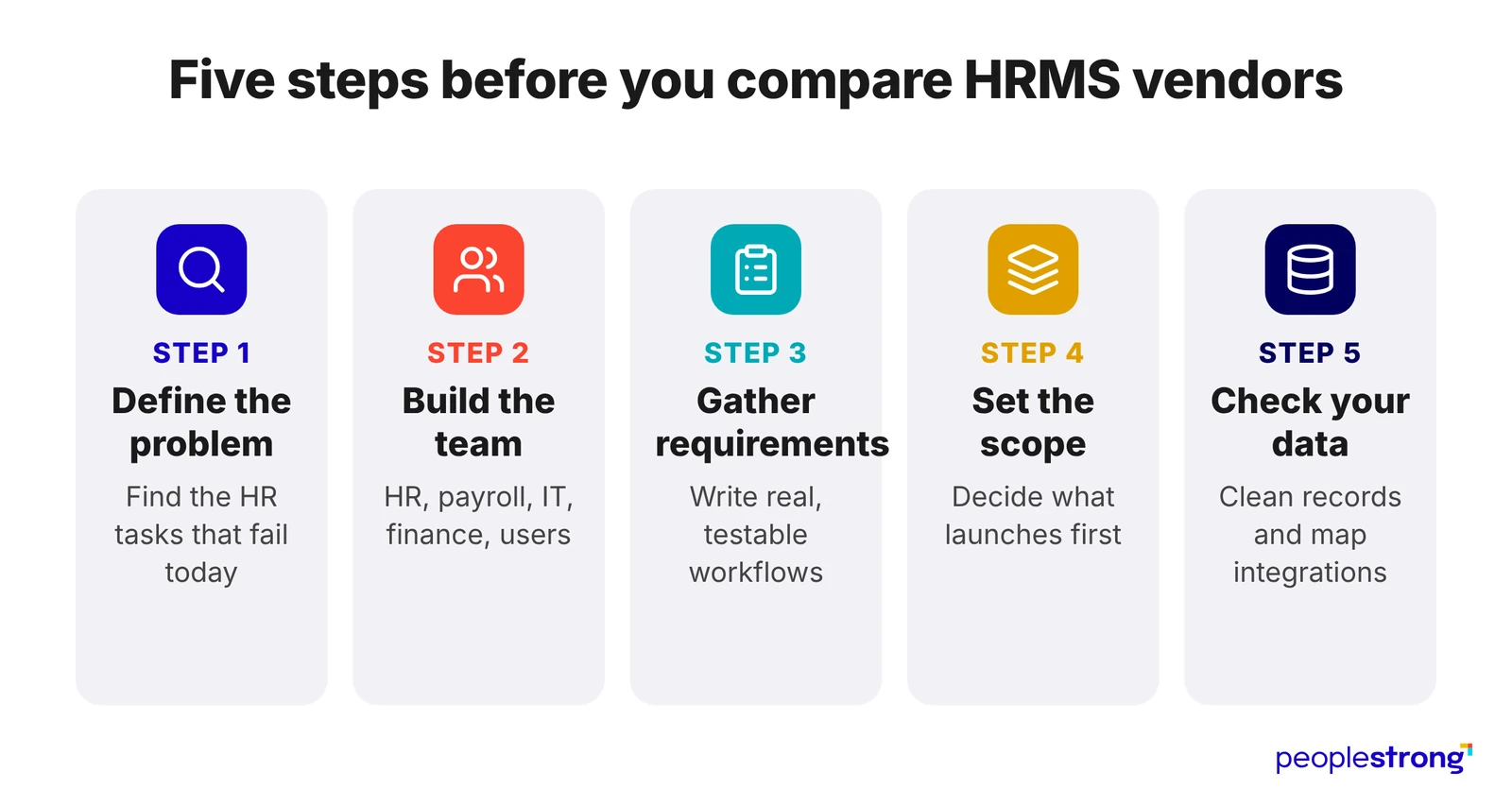
1. Start With the Business Problem
Review the current HR process and ask:
- Which tasks involve repeated data entry?
- Where do approvals get delayed?
- How many payroll corrections occur each month?
- Which reports require manual preparation?
- Which employee requests take up the most HR time?
- Which processes depend on spreadsheets or one person’s knowledge?
- What will become difficult as the organisation grows?
Pro tip: Record the current processing time, error rate and request volume for each major issue. Use these figures to set clear targets.
2. Build a Cross-Functional HRMS Selection Team
HR should own the requirements and final recommendation, with input from teams that will use, fund and support the system.
- Payroll tests pay rules, exceptions and statutory requirements.
- Finance reviews payroll controls, reconciliation and total cost.
- IT assesses integrations, identity management, migration and technical support.
- Information security examines permissions, audit trails, data hosting and incident controls.
- Procurement and legal review pricing, service levels, renewal terms and exit clauses.
- Managers test approvals, reporting and team administration.
- Employees assess self-service, mobile access and ease of use.
- The executive sponsor settles scope, budget and priority conflicts.
Pro tip: Name one decision owner and define who recommends, approves and advises. Agree on evaluation criteria before vendor meetings so that influence does not shift towards the strongest presenter or most senior stakeholder.
3. Gather HRMS Requirements From Real Workflows
Write each requirement as a specific task, including the user, conditions and expected result.
A factory manager must create rotating shifts, approve overtime and send validated attendance to payroll without using a spreadsheet.
Cover six areas:
- Functional: Recruitment, onboarding, employee records, attendance, leave, payroll, expenses, performance, learning and offboarding.
- Workforce: Countries, entities, employment types, shifts, unions, currencies, languages and pay cycles.
- Compliance and security: Statutory rules, permissions, audit trails, encryption, data location, retention and deletion.
- Technical: Integrations, APIs, single sign-on, migration, mobile access, reporting and availability.
- Service: Implementation ownership, training, support hours, response times and escalation.
- Growth: Expected headcount, entities, locations and configuration needs over the next three years.
Pro tip: Ask vendors to classify each capability as standard, configurable, customised, partner-delivered or planned, and demonstrate every mandatory requirement live.
4. Define the HRMS Scope and Rollout Priorities
Decide what the first release must include and what can wait. Trying to replace every HR process at once increases configuration, testing and adoption risk.
Set priorities based on operational dependence:
- Which modules must launch together?
- Can payroll operate safely if attendance launches later?
- Which countries or entities should move first?
- Which existing systems can be retired?
- Which processes must continue temporarily during the transition?
- Are payroll year-end, appraisal cycles or peak hiring periods unsuitable for launch?
Pro tip: Document the dependencies between modules, integrations and business dates. Ask vendors to propose a phased rollout with clear entry and exit criteria for each stage.
5. Assess HR Data and Integration Readiness
An HRMS cannot correct inconsistent source data during migration. Review employee records, job codes, reporting lines, leave balances, payroll history and statutory details before evaluating implementation plans.
Identify:
- Duplicate, incomplete or outdated employee records
- Data that exists only in spreadsheets or emails
- Conflicting job titles, departments or location codes
- Historical records that must be migrated
- Systems that send or receive employee data
- Owners responsible for validating each data set
- Integrations that require real-time updates rather than scheduled files
Pro tip: Create a source-to-destination data map showing what moves, where it comes from, how often it changes and who verifies it. This exposes migration effort early and prevents vendors from basing timelines on clean-data assumptions that don’t reflect reality.
8 Common HRMS Vendor Red Flags
| Red flag | Why its important | What to request |
|---|---|---|
| The vendor avoids demonstrating your workflows. | Standard demos can hide gaps in payroll, approvals and reporting. | Ask for a live demo using your scenarios and sample data. |
| Mandatory features exist only on the roadmap. | Planned releases may be delayed, changed or cancelled. | Treat the feature as unavailable until it is released and tested. |
| The implementation team has not been identified. | Sales consultants may not be involved after the contract is signed. | Meet the project manager and functional leads before selection. |
| The price excludes assumptions and limits. | Migration, integrations, support and additional modules may increase the final cost. | Request an itemised quote covering implementation and ongoing charges. |
| Custom development is presented as configuration. | Custom code usually costs more and can complicate future upgrades. | Ask which changes an administrator can make independently. |
| Comparable customer references are unavailable. | General references may not reflect your workforce size or complexity. | Speak with customers using similar modules in similar operating conditions. |
| The vendor cannot explain how its AI features use employee data. | Poor controls can create privacy, security and employment risks. | Request details on data storage, model training, access and human review. |
| Data extraction is limited or expensive. | Leaving the platform may become costly and time-consuming. | Confirm export formats, fees, timelines and deletion procedures in the contract. |
Make the Final Choice on Evidence
After the demos, return to the requirements and scores agreed at the start.
Check how each vendor handled unusual pay rules, backdated changes, failed integrations and custom reports.
Review the proposed implementation team, support terms, customer references and five-year cost.
Choose the vendor that answered difficult questions clearly and demonstrated the required workflows. Before signing, confirm who owns data migration, how urgent issues are escalated, which services cost extra and how employee data can be exported.
Apply the same checks when evaluating PeopleStrong or any other HRMS vendor. The final choice should work during payroll runs, policy changes and periods of growth. These moments determine whether the system was worth buying.
Frequently asked questions
What is the most important factor when selecting an HRMS vendor?
Operational fit is the most important factor in HRMS vendor selection. The system must support the organisation’s workforce structure, payroll rules, compliance requirements, integrations and approval processes. Buyers should also assess implementation expertise, security, customer support and total cost.
How should a company gather HRMS requirements?
A company should gather HRMS requirements by consulting HR, payroll, finance, IT, managers and employees. Convert current processes, errors, and delays into testable scenarios, and classify them as mandatory, important, or optional.
How many HRMS vendors should a company shortlist?
A company should generally shortlist three to five HRMS vendors. The shortlist should include vendors that meet essential requirements for workforce size, geography, compliance, technology and budget. Fewer qualified options allow more detailed demonstrations, reference checks and cost comparisons.
What should an HRMS vendor scorecard include?
An HRMS vendor scorecard should cover functional fit, usability, integrations, security, implementation, support, scalability, total cost and product direction. Each category should have an agreed weight, and every evaluator should use the same scoring scale.
What should buyers ask during an HRMS demo?
Buyers should ask the HRMS vendor to complete real workflows involving payroll exceptions, attendance, transfers, approvals, reporting, data corrections and integrations. The demo should also show the employee and manager experience, error handling and any tasks that require vendor support.
What is the difference between an RFI, RFP and RFQ in HRMS selection?
An RFI collects general information about HRMS vendors and their capabilities. An RFP asks shortlisted vendors to explain how they will meet defined business and technical requirements. An RFQ requests comparable pricing and commercial terms.
How long does HRMS vendor selection take?
HRMS vendor selection can take several weeks for a smaller company and several months for a large or complex organisation. Requirements gathering, vendor demonstrations, security reviews, reference checks, procurement approvals and contract negotiations determine the final timeline.