











 About Us
 Brand
 Career
 Contact Us



 +91-7314623098


Quick overview:
Types of payroll software include cloud-based, on-premise, and hybrid. Cloud-based software runs on provider-hosted servers and needs low IT maintenance. On-premise software runs on your own servers and gives you greater data control. Hybrid software combines both. The right type depends on your budget, IT resources, and data control needs.
Key takeaways
- Payroll software automates salary calculations, tax deductions, payslips, and compliance tasks.
- The right software improves accuracy, controls costs, and protects sensitive employee data.
- Cloud-based software offers easy access, automatic updates, and low IT maintenance.
- On-premise software gives you tighter data control but needs higher setup costs and IT support.
- Hybrid software combines both, though setup and integration take extra time.
- Compare your needs, features, security, total cost, and scalability before you choose.
Efficient payroll management is crucial for any business. Whether you want to maximize employee satisfaction or steer clear of compliance headaches, developing a payroll process that’s fast, accurate, and reliable always helps.
Automation can make this easier by reducing manual work and streamlining calculations. Yet, 51% of businesses still rely on manual payroll methods. The reason? High costs, complex setup, a steep learning curve, and the fear of losing control.
However, these drawbacks often arise when a business chooses the wrong payroll software. So in today’s blog, we’ll discuss the three types of payroll software: cloud-based, on-premise, and hybrid. Understand their pros and cons to find what works best for your business and reap the maximum benefits of payroll automation.
What Is Payroll Software?
Payroll software is a digital platform that automates repetitive payroll tasks like employee salary calculations, statutory and tax deductions, overtime and leave management, payslip generation, and salary processing. This helps businesses save time, reduce manual labor, and minimize the risk of errors.
Many tools also offer other features like employee self-service portals, payroll reporting, attendance tracking, and integration with accounting and HR systems. Depending on the solution, you can also use it to manage employee benefits, maintain payroll records, and stay on top of tax and regulatory requirements.
Why Is It Important to Choose the Right Payroll Software?
The right payroll software does more than just eliminate manual work and simplify salary disbursements. It also helps your business improve accuracy, manage costs, and build employee trust. Here’s how:
Improve Payroll Accuracy
As per research, businesses lose up to $922,000 every year due to payroll errors. The right payroll software helps avoid this costly mistake by reducing manual errors and helping employees receive accurate paychecks every time.
Maintain Regulatory Compliance
To manage payroll compliance, businesses must calculate tax withholdings, maintain payroll records, and follow the latest tax laws and employment regulations. However, keeping up with changing rules can get tricky. A solid payroll tool automates many of these tasks, making compliance easier to manage.
Control Payroll Costs
Payroll software costs depend on multiple factors, including features, setup requirements, employee count, and customizations. Choosing the right software ensures you pay only for the features you need, helping you avoid unnecessary expenses while also improving cost-efficiency.
Protect Employee Data
Payroll records contain several sensitive employee data, including their bank details, tax records, home addresses, and government identification numbers. A good payroll tool comes equipped with all the necessary security features you need to protect this data from breaches and cyberattacks.
Boost Employee Satisfaction
More than 57% of employees worldwide live paycheck to paycheck. So even a small mistake or delay in salary processing can frustrate them and erode their trust. The right payroll software helps prevent payment errors and delays, ensuring employees receive the correct salary on time.
3 Types of Payroll Software You Can Consider in 2026: Pros, Cons, and Examples
The right type of payroll software depends on your business’s infrastructure, budget, and data-control needs. Read on to understand which option is right for your business: cloud-based, on-premise, or hybrid.
| Type of payroll software | Key features | Pros | Cons | Best for |
|---|---|---|---|---|
| Cloud-based | • Access payroll online • Automatic software updates • Data stored on cloud servers • Remote access for authorized users | • Easy access • Low IT maintenance • Easy scalability • Automatic updates | • Internet dependency • Recurring fees • Limited hosting control • Provider-dependent security | Businesses that want flexibility and simpler maintenance |
| On-premise | • Installed on company servers or computers • Data stored within your own infrastructure • Updates managed internally • Access controlled by your IT team | • Greater data control • Custom configurations • Internal access control • Hosting independence | • High setup costs • Manual maintenance • IT resource demands • Complex scaling | Businesses with dedicated IT teams and specific data-control needs |
| Hybrid | • Combines cloud and on-premise systems • Some data or processes stay in-house • Online access to selected tools • Integrates local and cloud infrastructure | • Flexible access • Balanced data control • Existing system compatibility • Custom infrastructure options | • Complex setup • Integration challenges • Dual-system maintenance • Variable costs | Businesses that need both cloud access and local infrastructure |
1. Cloud-Based Payroll Software
Cloud-based payroll software lets you manage payroll online without maintaining your own servers. Your provider hosts the software and typically handles updates, so your team can spend less time managing IT tasks. You can also access payroll information from different locations, making this option useful if you have remote employees or multiple offices.
For example, PeopleStrong’s Payroll Software. It’s cloud-based and equipped with smart features that help businesses automate salary calculations, manage payroll compliance, and give employees online access to their payslips. However, you’ll need a reliable internet connection and should account for recurring subscription fees.
2. On-Premise Payroll Software
On-premise payroll software runs on your company’s own computers or servers. This means your business has more direct control over its payroll infrastructure, data access, and system configuration. You can also manage updates according to your internal processes, provided you have the resources to maintain the software.
This setup may suit businesses with dedicated IT teams or specific data-control requirements. However, you’ll need to budget for installation, maintenance, security, and upgrades. These responsibilities can add to your costs and your team’s workload.
3. Hybrid Payroll Software
Hybrid payroll software combines cloud-based services with systems that run on your own infrastructure. For instance, your business might retain certain data or processes in-house while using cloud-based tools for online access and other payroll tasks.
This approach gives you more flexibility if you need to maintain some control over your infrastructure without giving up the convenience of cloud services. However, you’ll need to make sure the different systems work well together. Setup, integration, and ongoing maintenance can also require additional time and resources.
| Pro Tip: When comparing the different types of payroll systems, consider how much control you need, what your team can maintain, and how each option fits your budget before making a decision. Once you have a clear idea of your priorities, you can narrow down your options and choose a solution that makes payroll easier to manage as your business grows. |
|---|
Tips to Select the Right Payroll Software for Your Business
Choosing the right payroll software depends on your business size, payroll needs, budget, and existing systems. As you compare the types of payroll software, consider these factors to find the best one for your needs:
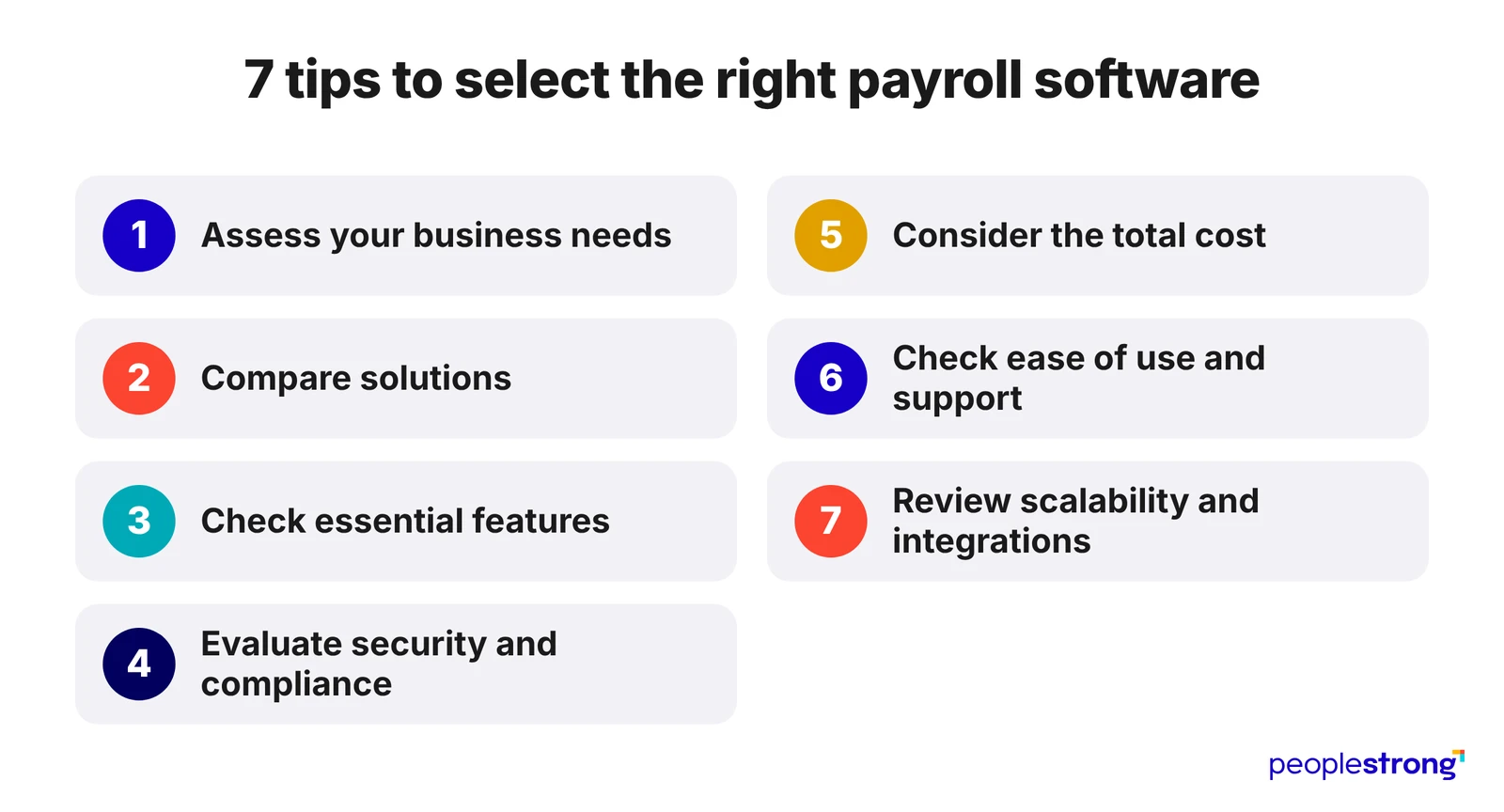
1. Assess Your Business Needs
Start by identifying your payroll requirements. Consider the number of employees, pay schedules, overtime calculations, leave policies, tax deductions, and reporting needs. If you operate across multiple locations, check whether the software supports the relevant tax rules and payroll requirements.
2. Compare Solutions
Each type offers different levels of accessibility, control, and maintenance. Cloud-based software lets you access payroll online, while on-premise solutions give you more direct control over your infrastructure. Hybrid solutions combine elements of both. Choose the setup that fits your IT resources, security needs, and preferred level of control.
3. Check Essential Features
Look for features that address your day-to-day payroll tasks, such as automated salary calculations, tax deductions, payslip generation, and payroll reporting. Depending on your needs, you may also want attendance tracking, employee self-service, benefits management, and accounting or HR integrations.
4. Evaluate Security and Compliance
Payroll software handles sensitive employee and financial information, so security should be a priority. Look for features such as data encryption, role-based access controls, and secure backups. Also, check whether the software helps you meet the tax and employment regulations relevant to your business.
5. Consider the Total Cost
Don’t compare payroll software based on subscription fees alone. Factor in implementation, training, maintenance, upgrades, and any additional charges for extra employees or features. Understanding the total cost helps you choose software that fits your budget as your business grows.
6. Check Ease of Use and Support
A complicated system can slow down payroll processing and make training harder. Look for software with a clear interface and a straightforward setup process. Check what support the provider offers, including onboarding, troubleshooting, and help with payroll-related issues.
7. Review Scalability and Integration Options
Your payroll needs may change as you hire more employees or expand into new locations. Choose software that can accommodate growth without requiring a complete system change. Check whether it integrates with your existing accounting, HR, and time-tracking tools to reduce duplicate data entry.
Conclusion
Payroll management affects more than your finance team’s workload. It influences compliance, employee trust, data security, and your ability to manage a growing workforce. So start by assessing your payroll requirements, IT resources, security needs, and budget. Whether you choose cloud-based, on-premise, or hybrid software, prioritize accuracy, compliance, and scalability.
Ready to simplify payroll without compromising accuracy or compliance? Explore PeopleStrong. Our cloud-based payroll software offers features such as automated salary calculations, attendance and leave integrations, employee self-service, and payroll reporting to help your business streamline payroll operations.
Hurry up! Get in touch today.
Frequently asked questions
What is the difference between payroll software and HRMS?
Payroll software handles salary calculations, deductions, and payslips. An HRMS covers the whole employee journey, from hiring to exit, and usually includes payroll as one module.
What is the difference between payroll software and payroll outsourcing?
With payroll software, your own team runs payroll using automated tools. With outsourcing, a third-party provider processes salaries and handles filings for you.
What are common mistakes businesses make while implementing payroll software?
Businesses often skip data cleanup, rush employee training, and ignore parallel test runs. Many also pick software without checking compliance support or defining their payroll needs first.
How long does it take to implement payroll software?
Most businesses need a few weeks to a few months. Timelines depend on your company size, the quality of your data, and the number of integrations you need.
Do you still need a payroll specialist or accountant if you use payroll software?
Yes. Software handles the calculations, but a specialist still reviews inputs, fixes exceptions, and keeps your payroll aligned with current tax and labor rules.