













 About Us
 Brand
 Career
 Contact Us



 +91-7314623098


Quick overview:
A salary slip format is a structured layout employers use to show an employee’s earnings, deductions and net pay for a specific pay period, usually a month. It should include employer and employee details, the pay period, paid days, itemised earnings, deductions and take-home salary. Calculate net pay by subtracting total employee deductions from gross earnings. For example, gross earnings of ₹60,000 minus deductions of ₹5,040 gives a net salary of ₹54,960.
Key takeaways
- Include the details needed to check pay: A salary slip should show employer and employee details, the pay period, paid days, earnings, deductions and net pay.
- Calculate take-home pay from gross earnings: Subtract total employee deductions from gross earnings to arrive at net salary.
- Keep CTC, gross salary and net salary distinct: CTC can include employer contributions and annual benefits, so dividing it by 12 may not match the monthly bank credit.
- Check attendance and individual pay components: Verify paid days, LOP, recurring allowances and temporary recoveries before comparing net pay with the bank credit.
- Use an employer-issued copy for income records: A template can help estimate salary, but the official payslip should come from the employer or an authorised payroll provider.
- Save each month’s payslip: Keep original and corrected copies so you can verify income and follow up on payroll discrepancies.
Your salary has arrived, but the amount is lower than you expected.
You open the payslip and find a deduction you cannot place. A clear salary slip should show what the deduction is and how it affected your take-home pay.
It should connect your agreed pay, the work period, deductions and the amount credited to your account.
Use this guide to learn how to read a pay slip template and build one easily.
What is a salary slip?
A salary slip is an employer-issued record of an employee’s pay for a defined period, usually one month.
Also called a payslip or pay slip, it shows the paid days, basic salary, allowances, bonuses and deductions used to calculate gross earnings and net pay.
Employees can use the document to:
- verify the amount credited to their bank account
- identify payroll errors
- prove their income when applying for a loan, visa, rental or new job
For employers, each salary slip creates an auditable record of the amount earned, deducted and paid.
What should a pay slip format include?
A useful pay slip lets an employee trace the month’s salary from paid days to bank credit.
Arrange the information in this order: employer details, employee details, pay period, attendance, earnings, deductions and net pay.
Employer and employee details
Include only the information needed to identify the employer and match the slip to the correct employee:
- Employer’s legal name and registered address
- Employee’s name and ID
- Designation and department
- PAN and UAN where applicable
- ESI number where applicable
- Masked bank account number
Pro tip: Show only the last four digits of the bank account. Mask PAN and UAN in public samples used for training/marketing.
Pay period and attendance
The attendance block explains why actual earnings may differ from the employee’s standard monthly salary.
| Field | What to enter | What it helps verify |
|---|---|---|
| Pay period | Start date and end date | Salary covered by the slip |
| Payment date | Date salary was transferred | Timing of the bank credit |
| Total days | Calendar days in the pay period | Basis used by payroll |
| Paid days | Days counted for salary | Payable earnings |
| LOP days | Unpaid absence | Reduction in earnings |
| Joining or exit date | Date applicable to the month | Partial-month salary |
Paid days can include weekly offs and approved paid leave. Compare the figure with the attendance policy before treating it as days physically worked.
Pro tip: If payroll uses a 30-day basis throughout the year, then state it in the payroll policy. A February payslip should not leave employees guessing which divisor was used.
Earnings and deductions
Give every component its own line. A single “allowances” figure makes revisions and payroll errors difficult to check.
| Section | Entries to show separately | Monthly check |
|---|---|---|
| Earnings | Basic pay, HRA, DA, special allowance, overtime and incentives | Match recurring amounts with the salary structure |
| One-time payments | Bonus, arrears and reimbursements | State the applicable month |
| Statutory deductions | Employee PF, ESI, professional tax and TDS | Apply current eligibility rules and rates |
| Other deductions | Salary advance, loan recovery and authorised insurance deduction | Show the reason and remaining balance where relevant |
| Totals | Gross earnings, total deductions and net pay | Confirm the arithmetic |
| Payment | Date, mode and masked account number | Match the bank credit |
Pro tip: Review templates that still hard-code the old ₹15,000 EPF coverage ceiling. The Union Cabinet increased the wage ceiling for mandatory EPFO coverage to ₹25,000 per month from 17 September 2026. Payroll teams should apply the scheme rules relevant to each employee.
Payslip sample with a worked calculation
The following payslip sample shows how each figure leads to the final payment.
| Employee and payroll detail | Sample entry |
|---|---|
| Employer | Example Manufacturing Pvt. Ltd. |
| Employer address | Bengaluru, Karnataka |
| Employee | Meera Shah |
| Employee ID | EMP-047 |
| Designation | Operations Executive |
| Department | Operations |
| Pay period | 1–31 October 2026 |
| Paid days | 31 |
| LOP days | 0 |
| Payment date | 31 October 2026 |
| Payment mode | Bank transfer |
| Bank account | Ending 4821 |
| PAN and UAN | Masked in this sample |
| Earnings | Amount | Employee deductions | Amount |
|---|---|---|---|
| Basic pay | ₹32,000 | Employee PF | ₹3,840 |
| House rent allowance | ₹12,800 | Professional tax | ₹200 |
| Special allowance | ₹15,200 | Salary advance recovery | ₹1,000 |
| Income-tax TDS | ₹0 | ||
| Gross earnings | ₹60,000 | Total deductions | ₹5,040 |
Net pay = ₹60,000 − ₹5,040 = ₹54,960
Amount in words: Rupees fifty-four thousand nine hundred and sixty only.
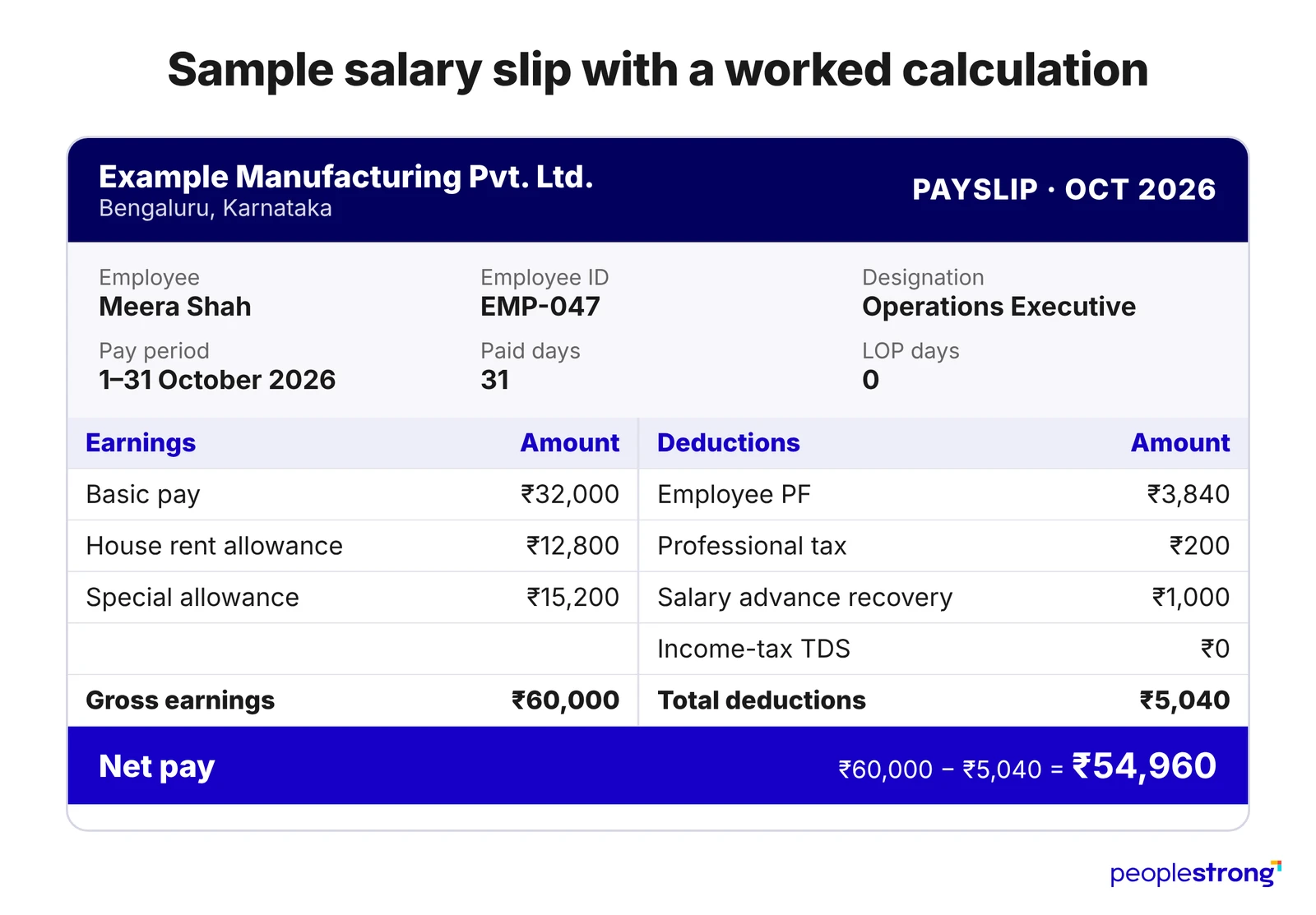
The sample assumes employee PF at 12% of the full basic pay under the employer’s contribution basis. Actual PF treatment depends on EPF membership and the wage basis the employer uses. Professional tax depends on the employee’s work location. TDS depends on projected annual taxable income and the selected tax regime.
The ₹1,000 salary advance recovery needs its own line because it is temporary. Payroll should stop the deduction when the approved balance reaches zero. The next payslip should then show a ₹1,000 increase in net pay if every other figure remains unchanged.
Pro tip: Add an “applicable period” column for arrears. An entry such as “April–June 2026 arrears” tells the employee why the payment appears in October and helps payroll answer future tax queries.
CTC, Gross Salary and Net Salary Explained
- CTC shows the employer’s total annual cost for the employee. It may include employer PF contributions, gratuity provisions, insurance and variable pay.
- Gross salary shows earnings for the pay period before employee deductions.
- Net salary shows the amount payable after employee deductions.
An annual CTC of ₹8.4 lakh does not establish a monthly bank credit of ₹70,000. Employer contributions and annual benefits can form part of CTC even when they are not paid through the monthly salary.
Use this calculation when reviewing a payslip:
Gross earnings − employee deductions = net pay
Employer PF contributions can appear in a separate information block. They should stay outside the employee-deduction total.
EY projected an average salary increase of 9.1% across India in 2026. The projection reached 10.4% for Global Capability Centres.
Pro tip: Check a salary revision against the effective date and the revised component values. A 9% increase in CTC may produce a different change in net pay because employer contributions, variable pay and tax can also change.
How to use a salary slip template in 5 easy steps
- Set the pay period: Enter the salary month, paid days and LOP days after attendance is finalised.
- Verify employee details: Check the employee ID, designation, PAN, UAN and masked bank account number against payroll records.
- Enter earnings for the correct period: Include basic pay, allowances, incentives and arrears. Identify the applicable month beside any arrears or one-time payment.
- Calculate each deduction separately: Apply the PF, ESI, professional tax and TDS rules in force for that month. Check loan or salary-advance recoveries against the remaining balance.
- Reconcile the final amount: Confirm that gross earnings minus total deductions equals net pay. Match the net pay with the amount scheduled for bank transfer.
Pro tip: Use Excel for calculations and protect formula cells from manual edits. Export the approved salary slip as a PDF to prevent accidental changes.
Five salary slip checks to make every month
- Verify paid days: Match them with your attendance, approved leave and LOP records. Share the disputed dates with payroll if the count is incorrect.
- Compare recurring earnings: Check basic pay, HRA and regular allowances against the previous month. After an increment, confirm the effective date and revised breakup.
- Review every deduction: Ask payroll to explain vague entries such as “recovery” or “other deduction.” For a salary advance, compare the deduction with the agreed instalment.
- Check the LOP calculation: Confirm the number of unpaid days and the amount reduced. Make sure the same absence has not affected pay twice.
- Match net pay with the bank credit: Check whether reimbursements, arrears or incentives were transferred separately if the figures differ.
Pro tip: Include the salary month, disputed entry, expected amount and supporting record in your payroll query.
Why keep your salary slips?
Your payroll portal may become inaccessible after you leave a job. You may need income records for years, so download each salary slip when it is issued.
Keeping these records also makes pay discrepancies easier to investigate.
In a recent survey, 25% of Australian workers reported noticing a payslip mistake in the previous 12 months.
Saved payslips can help you:
- Support income verification: A prospective employer may request recent salary slips. Check the required period and supporting documents before applying.
- Follow up on missing pay: Compare payslips across months to check whether an increment took effect.
- Keep a record of corrections: Save both the original and revised payslips, labelled by month and version, so you can follow up if a correction remains unresolved.
Pro tip: Store the files in a secure personal folder before changing jobs.
Give employees confidence in every payslip with PeopleStrong
A salary slip should settle questions about pay. Employees should be able to understand their take-home pay just by reading their salary slip.
HR teams can reduce payroll queries by using a salary slip format employees can easily follow.
But a clear format is only useful if the figures are correct.
HR teams need to check attendance records and salary calculations before issuing each slip and make it easy for employees to retrieve a copy.
PeopleStrong’s payroll software support this process through payslip generation and employee self-service, so employees can access their pay records when needed. Connect with the team to know more.
Frequently asked questions
Is a salary slip mandatory in India?
Section 50(3) of the Code on Wages, 2019 requires employers to issue wage slips in the prescribed form and manner, subject to the Code’s scope and exceptions. Employers should check the rules applicable to their establishment before choosing a salary slip format.
How can employees download a salary slip?
Employees can usually download a salary slip by logging into their employer’s HR or payroll portal, opening the payslip section and selecting the required month and year. If a salary slip is missing or the portal is unavailable, employees should request an employer-issued copy from HR or payroll.
Can an employee create their own salary slip?
Employees can use a salary slip template to calculate their expected pay, but an official salary slip must come from their employer or an authorised payroll provider. For proof of income, employees should request an official payslip rather than submit a self-prepared document as an employer-issued record.
What does YTD mean on a payslip?
YTD stands for “year to date.” On an Indian payslip, YTD usually represents the total earnings or deductions recorded from the start of the financial year in April through the current payroll period. For example, YTD gross earnings on a September payslip generally show the combined gross earnings from April to September.
Is HRA on a salary slip automatically tax-free?
House Rent Allowance (HRA) on a salary slip is not automatically tax-free. HRA exemption is unavailable under the new tax regime. Employees choosing the old tax regime may claim an exemption if they meet the eligibility conditions; the exempt amount depends on their salary, HRA received and rent paid.